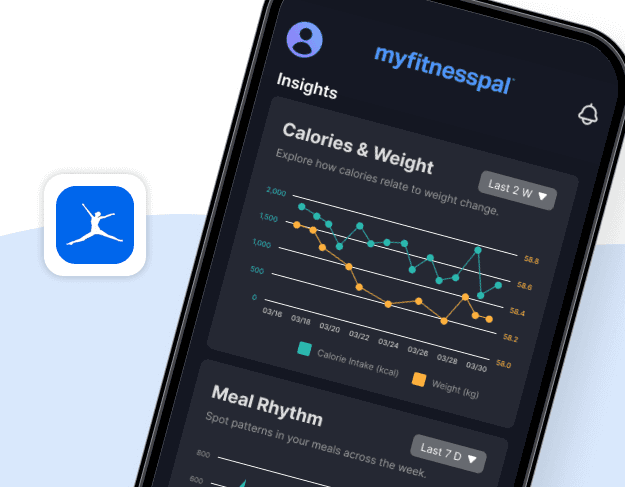
From Logging to Insight: Redesigning MyFitnessPal’s Visualizations and Feedback through a Health Informatics Lens
From Logging to Insight: Redesigning MyFitnessPal’s Visualizations and Feedback through a Health Informatics Lens
From Logging to Insight: Redesigning MyFitnessPal’s Visualizations and Feedback through a Health Informatics Lens
A research-driven redesign that helps MyFitnessPal move beyond logging to support real reflection and action.
A research-driven redesign that helps MyFitnessPal move beyond logging to support real reflection and action.
A research-driven redesign that helps MyFitnessPal move beyond logging to support real reflection and action.
Role
Role
Role
UX Designer Lead — Led data vis and UI redesign
UX Designer Lead — Led data vis and UI redesign
UX Designer Lead — Led data vis and UI redesign
Timeline
Timeline
Timeline
Mar 2025 – May 2025
Mar 2025 – May 2025
Mar 2025 – May 2025
Team
Team
Team
3-member collaboration across research and design
3-member collaboration across research and design
3-member collaboration across research and design
Tools
Tools
Tools
Figma
Figma
Figma
1. Project Context
1. Project Context
This project was completed as part of the Personal Health Informatics & Visualization course, which examines how health data can be captured, visualized, and transformed into feedback. Unlike a typical UX redesign, the emphasis here was on visualization and feedback mechanisms within nutrition tracking apps.
This project was completed as part of the Personal Health Informatics & Visualization course, which examines how health data can be captured, visualized, and transformed into feedback. Unlike a typical UX redesign, the emphasis here was on visualization and feedback mechanisms within nutrition tracking apps.
Over four weeks, I actively used MyFitnessPal with the goal of tracking nutrition and reflecting on eating patterns. To guide the evaluation, I drew on the Stage-Based Model of Personal Informatics Systems (Li, Dey, Forlizzi, 2010), which outlines five stages: Preparation, Collection, Integration, Reflection, and Action.
Over four weeks, I actively used MyFitnessPal with the goal of tracking nutrition and reflecting on eating patterns. To guide the evaluation, I drew on the Stage-Based Model of Personal Informatics Systems (Li, Dey, Forlizzi, 2010), which outlines five stages: Preparation, Collection, Integration, Reflection, and Action.
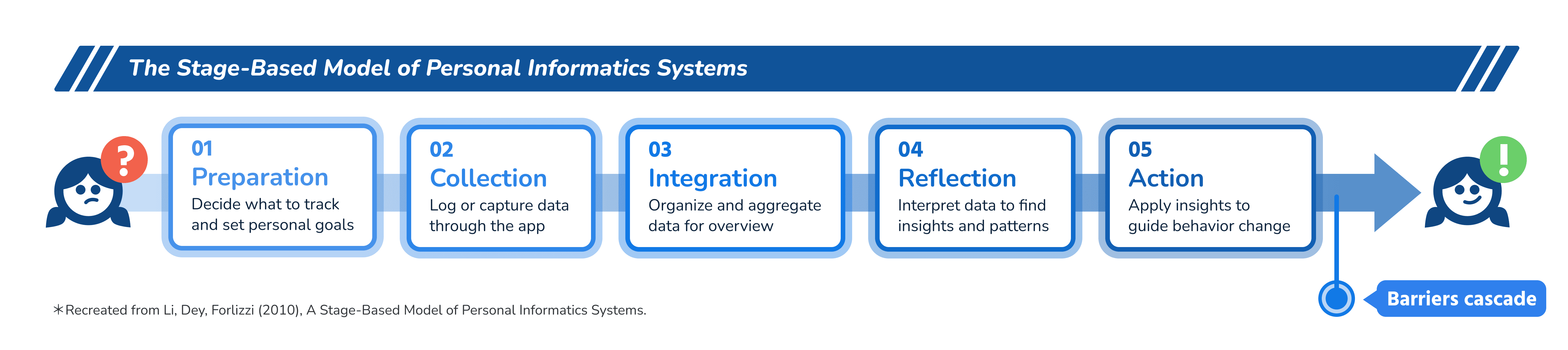
By situating the project within this model, I was able to assess MyFitnessPal not just as an interface, but as a system intended to support users across these different stages of personal informatics.
By situating the project within this model, I was able to assess MyFitnessPal not just as an interface, but as a system intended to support users across these different stages of personal informatics.
1. Project Context
This project was completed as part of the Personal Health Informatics & Visualization course, which examines how health data can be captured, visualized, and transformed into feedback. Unlike a typical UX redesign, the emphasis here was on visualization and feedback mechanisms within nutrition tracking apps.
Over four weeks, I actively used MyFitnessPal with the goal of tracking nutrition and reflecting on eating patterns. To guide the evaluation, I drew on the Stage-Based Model of Personal Informatics Systems (Li, Dey, Forlizzi, 2010), which outlines five stages: Preparation, Collection, Integration, Reflection, and Action.
By situating the project within this model, I was able to assess MyFitnessPal not just as an interface, but as a system intended to support users across these different stages of personal informatics.
2. Project Overview
2. Project Overview
2. Project Overview
Before diving into the redesign details, here’s an overview of how I approached the project — from identifying key breakdowns in MyFitnessPal’s user journey to defining the design focus and framing the solution areas. This section summarizes the “big picture,” while later sections unpack each redesign decision in detail.
Before diving into the redesign details, here’s an overview of how I approached the project — from identifying key breakdowns in MyFitnessPal’s user journey to defining the design focus and framing the solution areas. This section summarizes the “big picture,” while later sections unpack each redesign decision in detail.
Before diving into the redesign details, here’s an overview of how I approached the project — from identifying key breakdowns in MyFitnessPal’s user journey to defining the design focus and framing the solution areas. This section summarizes the “big picture,” while later sections unpack each redesign decision in detail.
01 Understanding the Problem
01 Understanding the Problem
01 Understanding the Problem
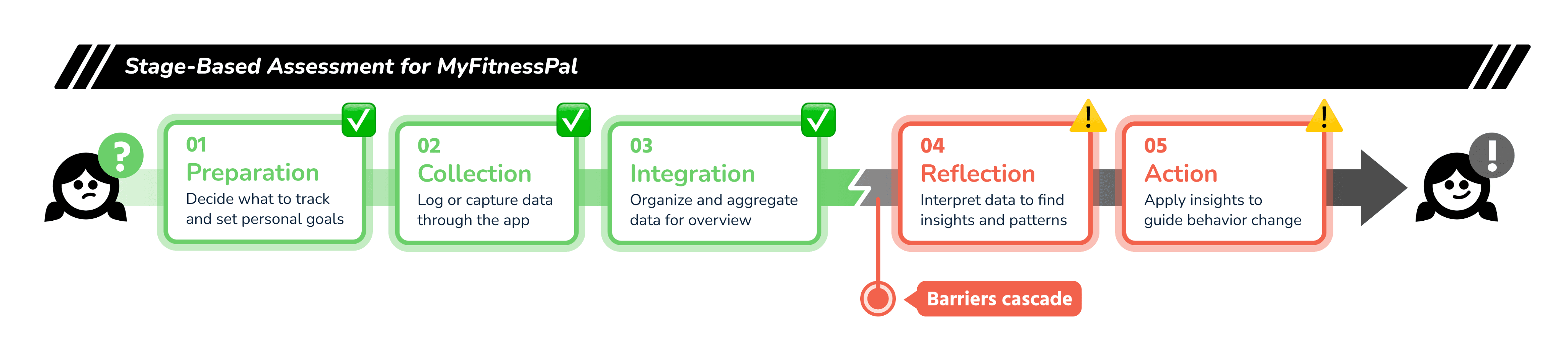
Using the Stage-Based Assessment Framework, we evaluated MyFitnessPal across five behavior-change stages — Preparation, Collection, Integration, Reflection, and Action.
Using the Stage-Based Assessment Framework, we evaluated MyFitnessPal across five behavior-change stages — Preparation, Collection, Integration, Reflection, and Action.
Using the Stage-Based Assessment Framework, we evaluated MyFitnessPal across five behavior-change stages — Preparation, Collection, Integration, Reflection, and Action.
While the app performed well in early stages, it showed clear breakdowns at Reflection and Action, where users struggled to interpret logged data or decide how to adjust their habits.
While the app performed well in early stages, it showed clear breakdowns at Reflection and Action, where users struggled to interpret logged data or decide how to adjust their habits.
While the app performed well in early stages, it showed clear breakdowns at Reflection and Action, where users struggled to interpret logged data or decide how to adjust their habits.
02 Design Focus
02 Design Focus
02 Design Focus
To bridge this gap, I focused the redesign around one guiding question:
To bridge this gap, I focused the redesign around one guiding question:
To bridge this gap, I focused the redesign around one guiding question:
How might visualization & feedback be redesigned to better support Reflection & Action in nutrition tracking?
How might visualization & feedback be redesigned to better support Reflection & Action in nutrition tracking?
How might visualization & feedback be redesigned to better support Reflection & Action in nutrition tracking?
03 Our Approach
03 Our Approach
03 Our Approach
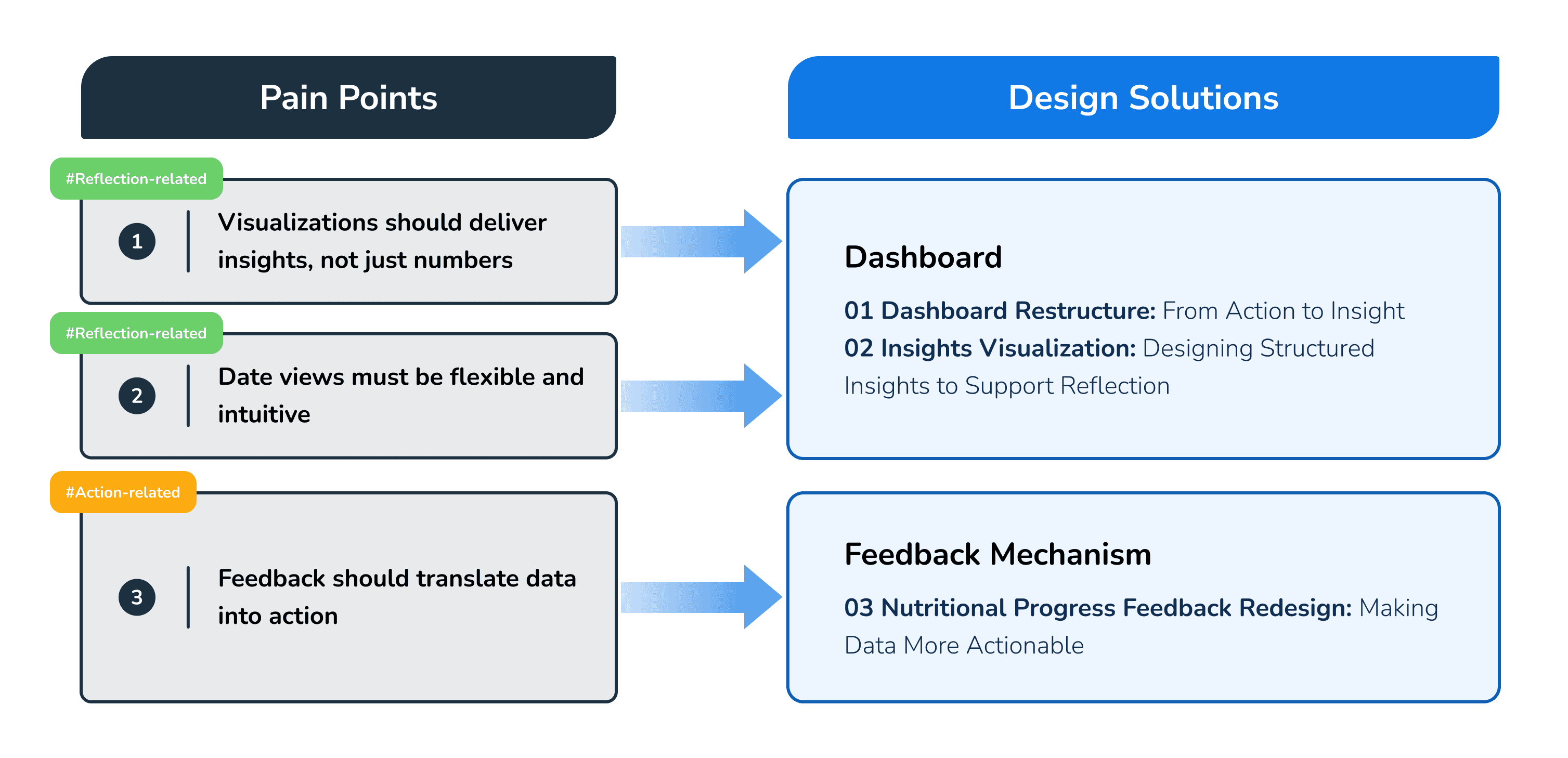
Based on the analysis, I identified three recurring pain points around insight delivery, flexibility, and feedback. These were grouped into two focus areas — Dashboard Redesign to improve reflection and Feedback Mechanism Redesign to make feedback more actionable.
Based on the analysis, I identified three recurring pain points around insight delivery, flexibility, and feedback. These were grouped into two focus areas — Dashboard Redesign to improve reflection and Feedback Mechanism Redesign to make feedback more actionable.
Based on the analysis, I identified three recurring pain points around insight delivery, flexibility, and feedback. These were grouped into two focus areas — Dashboard Redesign to improve reflection and Feedback Mechanism Redesign to make feedback more actionable.
04 Highlights
04 Highlights
04 Highlights
Here’s a quick look at part of the redesigned experience.
The prototype highlights how the new Dashboard supports reflection through clear visualizations — and you can scroll down to see the full redesign process in the Project Details section.
Here’s a quick look at part of the redesigned experience.
The prototype highlights how the new Dashboard supports reflection through clear visualizations — and you can scroll down to see the full redesign process in the Project Details section.
Here’s a quick look at part of the redesigned experience.
The prototype highlights how the new Dashboard supports reflection through clear visualizations — and you can scroll down to see the full redesign process in the Project Details section.
3. Project Details
3. Project Details
01 What the app does
01 What the app does
MyFitnessPal is one of the most widely used nutrition tracking apps, known for its large food database, barcode scanning, and calorie/macro tracking features. It also integrates with fitness devices, offering users a way to connect diet, exercise, and weight management.
MyFitnessPal is one of the most widely used nutrition tracking apps, known for its large food database, barcode scanning, and calorie/macro tracking features. It also integrates with fitness devices, offering users a way to connect diet, exercise, and weight management.
02 Our user perspective
02 Our user perspective
We approached MyFitnessPal as busy graduate students with limited nutrition knowledge but clear health goals:
Manage weight through balanced nutrition and regular activity
Develop awareness of eating patterns
Build a sustainable logging habit without adding mental load
We approached MyFitnessPal as busy graduate students with limited nutrition knowledge but clear health goals:
Manage weight through balanced nutrition and regular activity
Develop awareness of eating patterns
Build a sustainable logging habit without adding mental load
Over 4 weeks of daily use, we saw a clear split between what worked and what didn’t.
Over 4 weeks of daily use, we saw a clear split between what worked and what didn’t.
03 Stage-Based Assessment of MyFitnessPal
03 Stage-Based Assessment of MyFitnessPal
Our evaluation using the Stage-Based Model shows that MyFitnessPal performs strongly in the early stages—Preparation, Collection, and Integration—but provides limited support for Reflection and Action, where users need insights and guidance to change behavior.
Our evaluation using the Stage-Based Model shows that MyFitnessPal performs strongly in the early stages—Preparation, Collection, and Integration—but provides limited support for Reflection and Action, where users need insights and guidance to change behavior.
Where It Works
Where It Works
01
01
Preparation
Preparation
Quick onboarding and goal presets lower the start barrier.
Notifications nudge logging without being intrusive.
Quick onboarding and goal presets lower the start barrier.
Notifications nudge logging without being intrusive.

02
02
Collection
Collection
Large database + barcode → fast, reliable search.
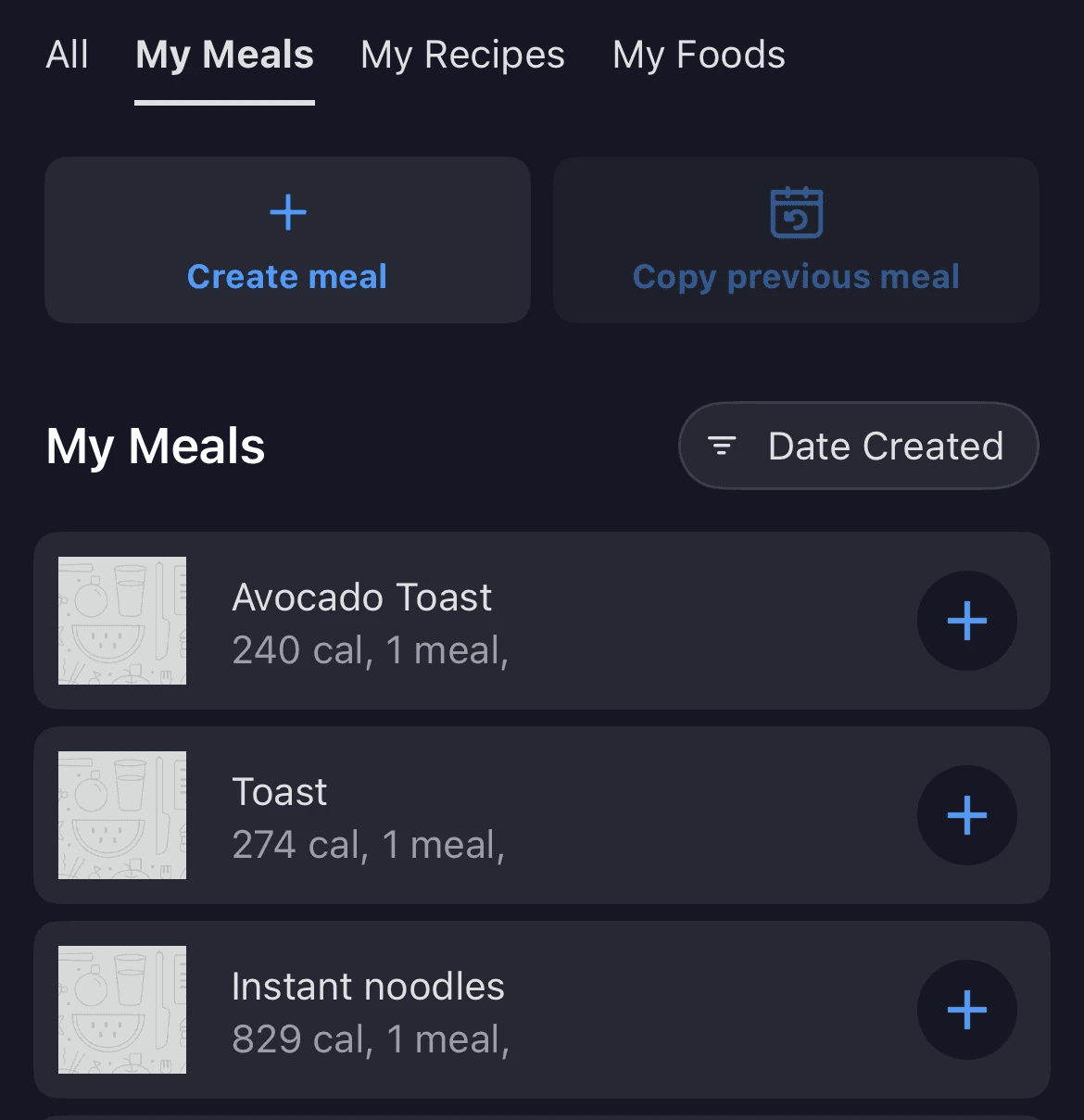
Shortcuts (Copy Previous Meal / My Meals) reduce repeat input.
Gesture navigation in the diary keeps flow efficient.
Large database + barcode → fast, reliable search.
Shortcuts (Copy Previous Meal / My Meals) reduce repeat input.
Gesture navigation in the diary keeps flow efficient.
03
03
Integration
Integration
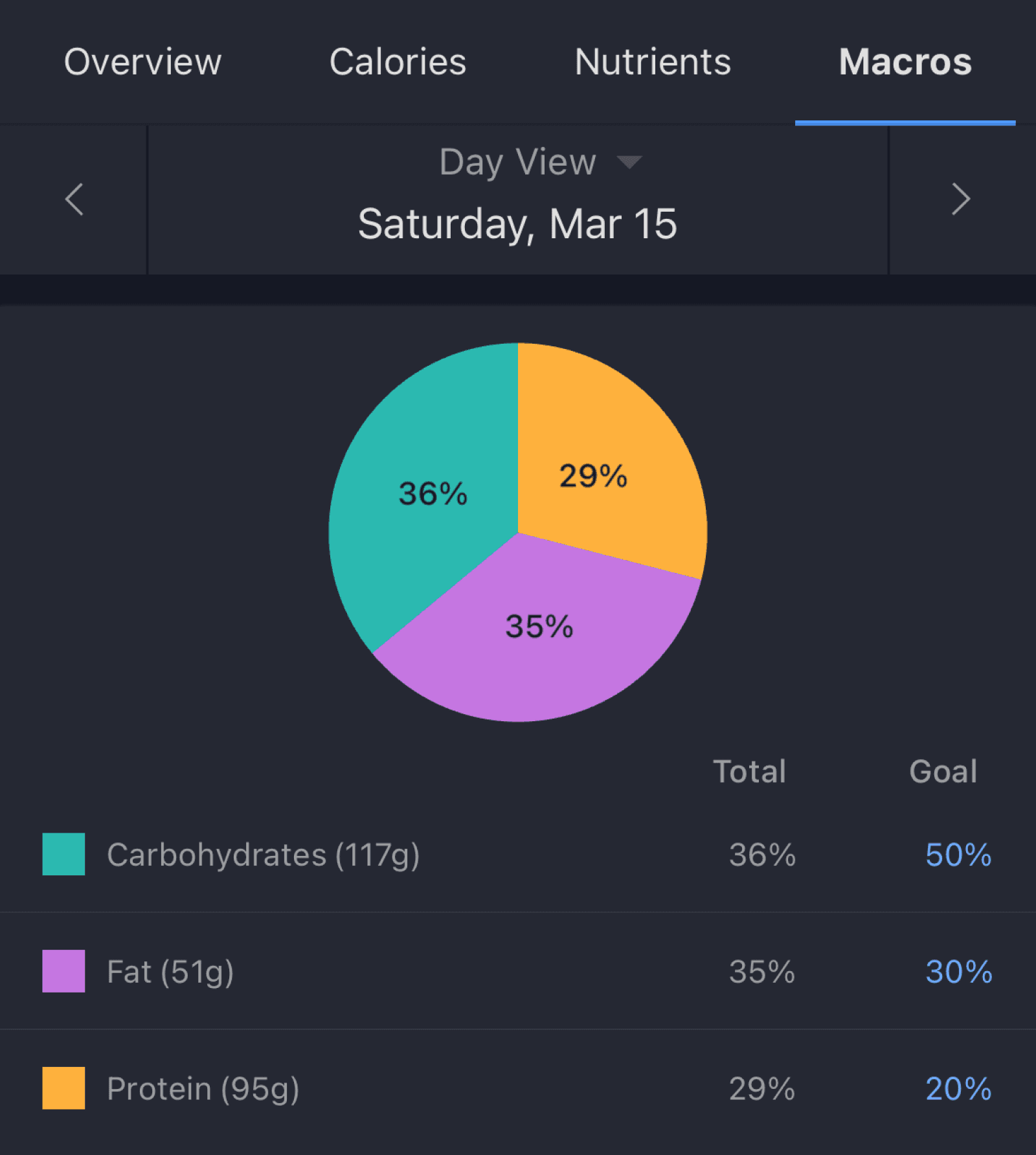
Auto totals for calories and macros; weekly/monthly rollups.
Clear separation of goal / food / exercise contributions.
Auto totals for calories and macros; weekly/monthly rollups.
Clear separation of goal / food / exercise contributions.
Where It Breaks
Where It Breaks
04
04
Reflection
Reflection
Homepage lacks insightful visualizations beyond basic numbers.
No charts that connect different metrics (e.g., intake vs. weight).
Users are left without clear guidance on how eating patterns actually impact outcomes.
Homepage lacks insightful visualizations beyond basic numbers.
No charts that connect different metrics (e.g., intake vs. weight).
Users are left without clear guidance on how eating patterns actually impact outcomes.
05
05
Action
Action
Nutrient goals show progress, but each food’s contribution to limits is invisible → hard to decide what to cut/keep.
Few cues that translate data into next best actions.
Nutrient goals show progress, but each food’s contribution to limits is invisible → hard to decide what to cut/keep.
Few cues that translate data into next best actions.

Bridging Reflection & Action
Bridging Reflection & Action
While MyFitnessPal excels at logging, it falls short in helping users reflect on patterns and take meaningful action. This gap led us to ask:
While MyFitnessPal excels at logging, it falls short in helping users reflect on patterns and take meaningful action. This gap led us to ask:
How might visualization & feedback be redesigned to better support Reflection & Action in nutrition tracking?
How might visualization & feedback be redesigned to better support Reflection & Action in nutrition tracking?
01 How do other nutrition apps support Reflection & Action?
01 How do other nutrition apps support Reflection & Action?
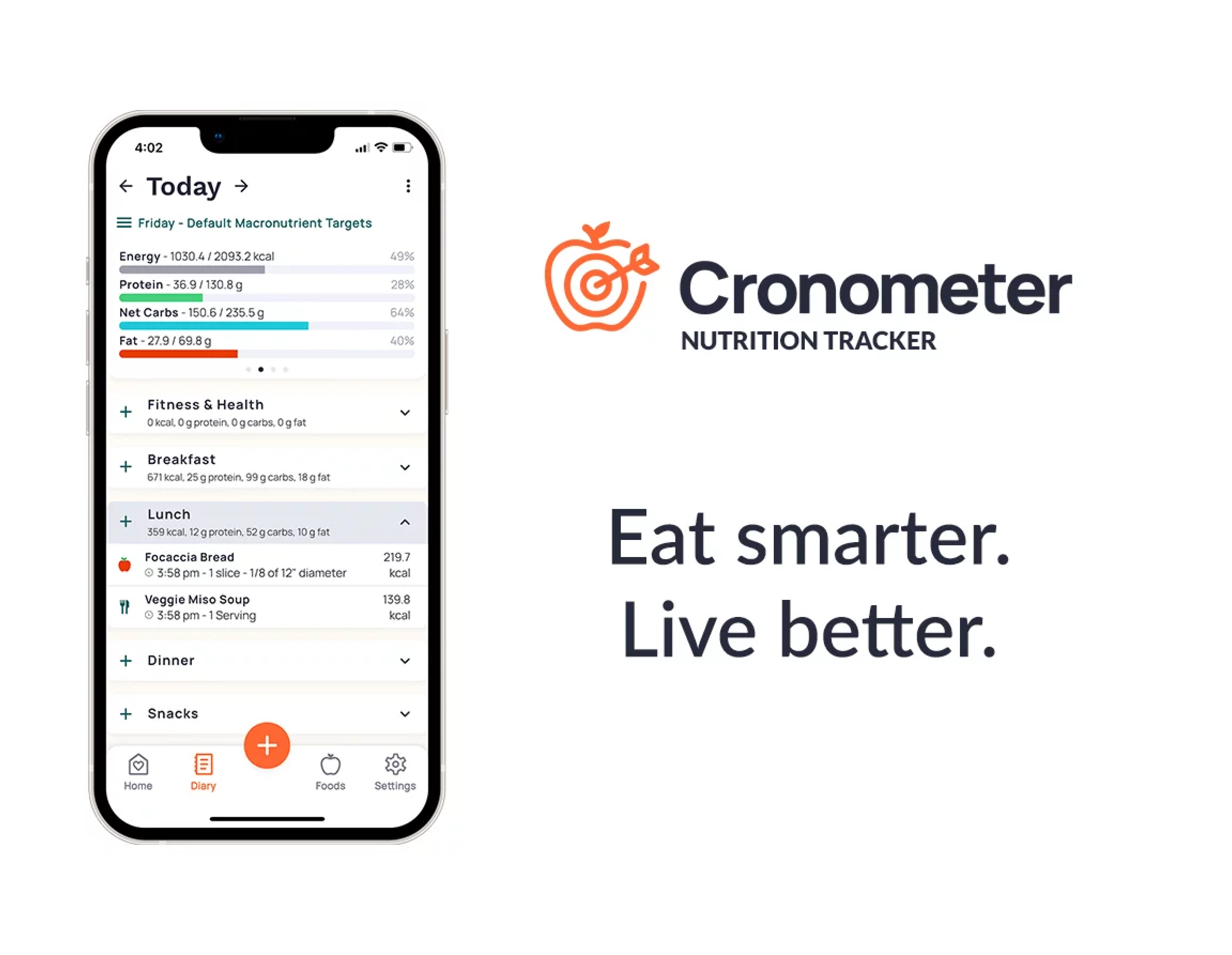
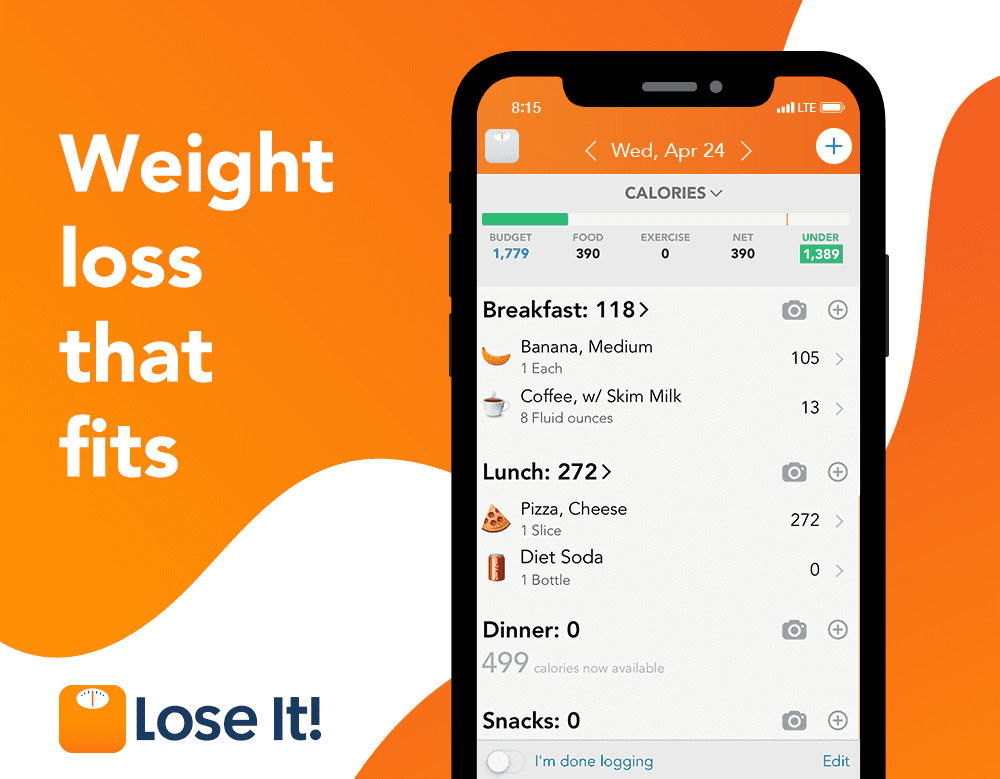
We evaluated competitor apps (Cronometer, Lose It!, MyNetDiary) to understand how visualization and feedback are designed to help users reflect on patterns and take action. While none of them fully solved the challenge, each offered design cues worth learning from.
We evaluated competitor apps (Cronometer, Lose It!, MyNetDiary) to understand how visualization and feedback are designed to help users reflect on patterns and take action. While none of them fully solved the challenge, each offered design cues worth learning from.

Cronometer
Cronometer
Advantage
Advantage
Insightful Vis on Dashboard
Vis & Date Range Flexibility
Nutritional Progress Feedback
Insightful Vis on Dashboard
Vis & Date Range Flexibility
Nutritional Progress Feedback

Lose It!
Lose It!
Advantage
Advantage
Insightful Vis on Dashboard
Vis & Date Range Flexibility
Insightful Vis on Dashboard
Vis & Date Range Flexibility

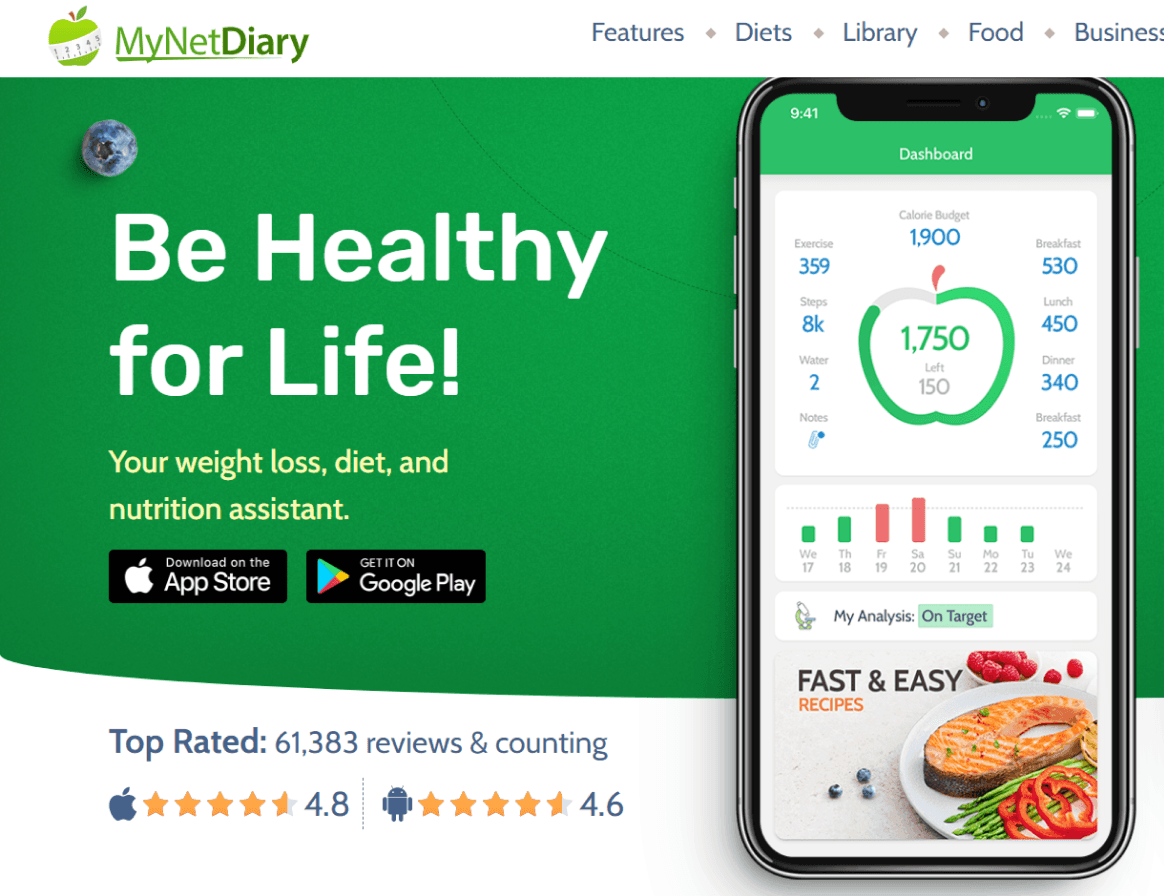
MyNetDiary
MyNetDiary
Advantage
Advantage
Insightful Vis on Dashboard
Insightful Vis on Dashboard
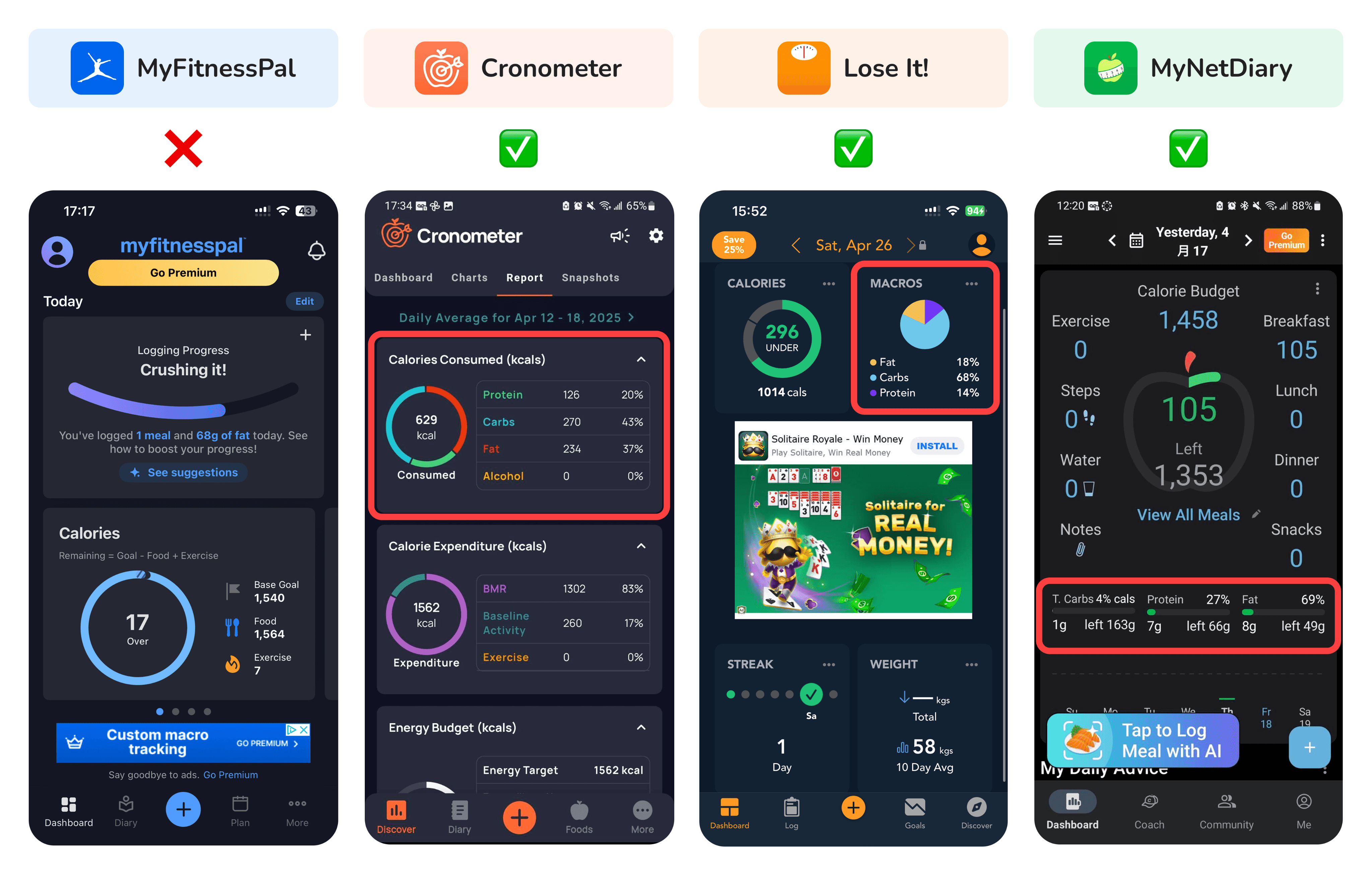
1. Insightful Visualizations on Dashboard
1. Insightful Visualizations on Dashboard
The homepage should provide at-a-glance insights like a macro breakdown.
MyFitnessPal: Only shows calories, no integrated chart.
Others: Provide macro breakdowns, but still mostly micro-level views, lacking connections across metrics.
The homepage should provide at-a-glance insights like a macro breakdown.
MyFitnessPal: Only shows calories, no integrated chart.
Others: Provide macro breakdowns, but still mostly micro-level views, lacking connections across metrics.
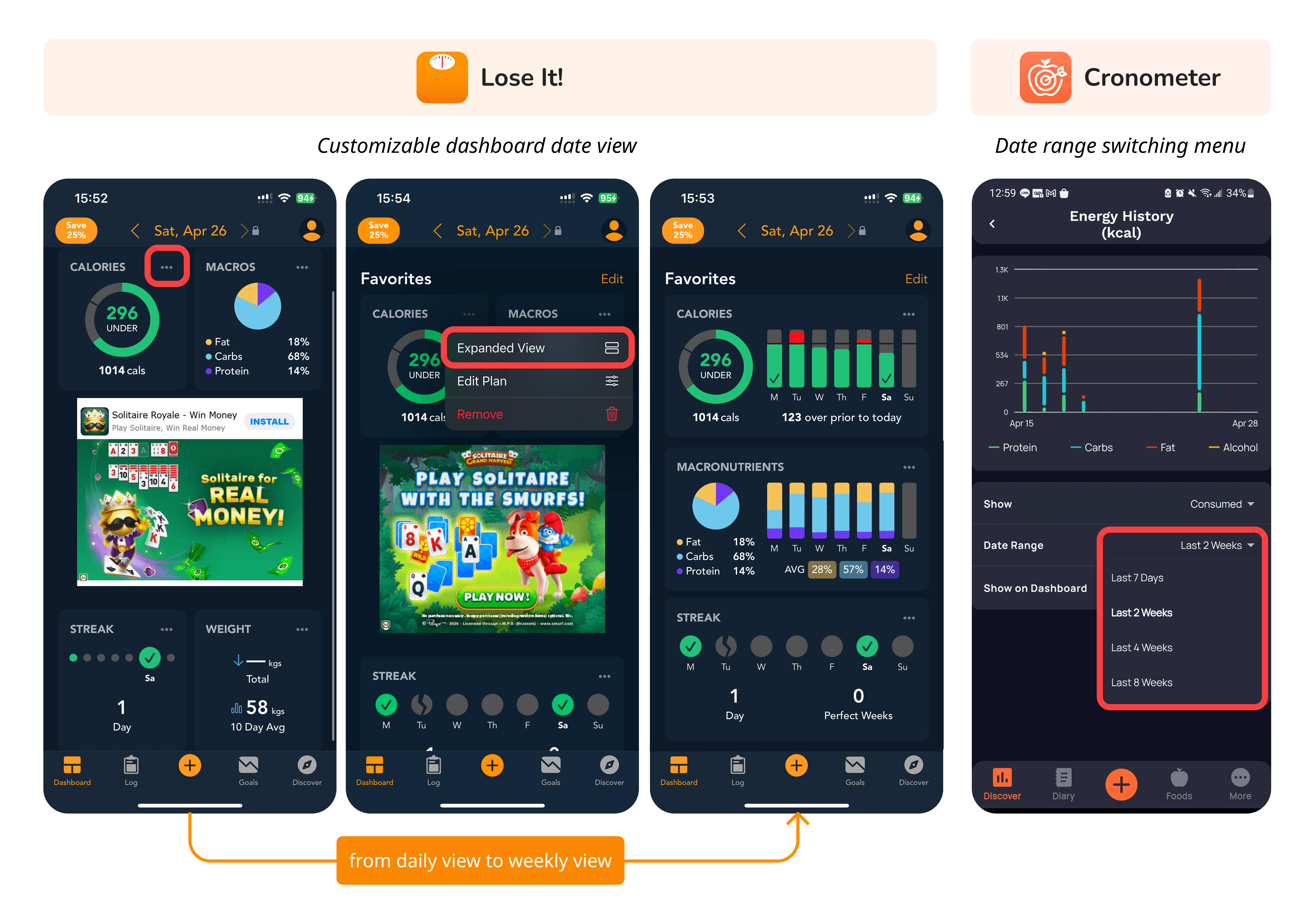
2. Visualizations & Date Range Flexibility
2. Visualizations & Date Range Flexibility
Effective reflection requires flexible time views.
Lose It!: Allows switching from daily to weekly views directly on the dashboard.
Cronometer: Provides a clear date range menu under each chart.
Effective reflection requires flexible time views.
Lose It!: Allows switching from daily to weekly views directly on the dashboard.
Cronometer: Provides a clear date range menu under each chart.
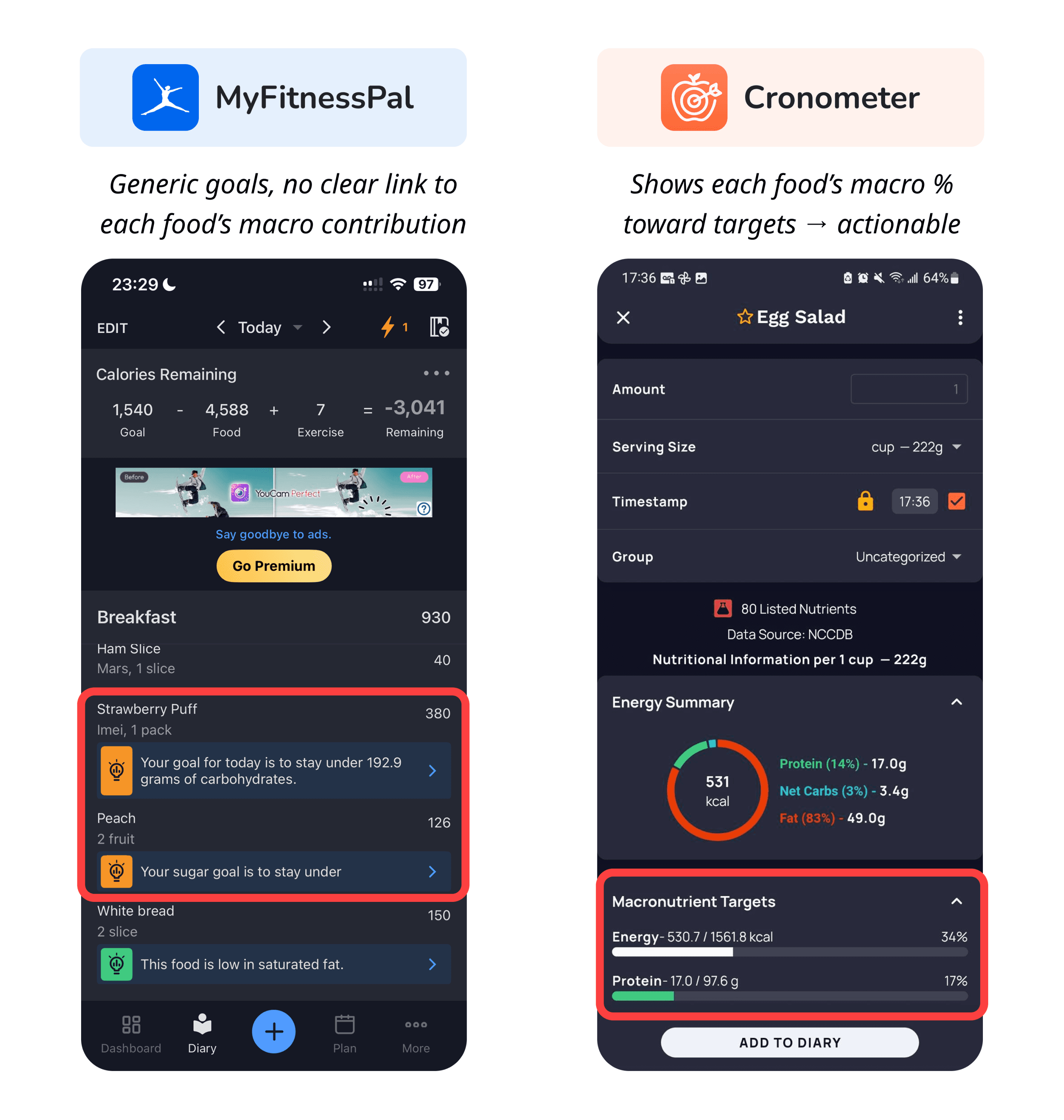
3. Nutritional Progress Feedback
3. Nutritional Progress Feedback
Effective feedback should help users understand how each logged food impacts their goals.
MyFitnessPal only restates generic daily targets (e.g., “stay under 192.9g carbs”), without showing how an individual food item contributes to those targets. This leaves users uncertain about what to adjust.
Cronometer, on the other hand, breaks down each food’s macronutrient contribution relative to the user’s goals. By visualizing percentages and highlighting imbalances, it enables users to reflect and take concrete next steps.
Effective feedback should help users understand how each logged food impacts their goals.
MyFitnessPal only restates generic daily targets (e.g., “stay under 192.9g carbs”), without showing how an individual food item contributes to those targets. This leaves users uncertain about what to adjust.
Cronometer, on the other hand, breaks down each food’s macronutrient contribution relative to the user’s goals. By visualizing percentages and highlighting imbalances, it enables users to reflect and take concrete next steps.
02 Lessons We Learned
02 Lessons We Learned
1
1
Visualizations should deliver insights, not just numbers
Visualizations should deliver insights, not just numbers
Charts need to go beyond raw data and reveal meaningful relationships (e.g., intake vs. weight) that help users reflect.
Charts need to go beyond raw data and reveal meaningful relationships (e.g., intake vs. weight) that help users reflect.
2
2
Date views must be flexible and intuitive
Date views must be flexible and intuitive
Switching between daily, weekly, and monthly perspectives should be tied directly to the chart, making trend exploration seamless.
Switching between daily, weekly, and monthly perspectives should be tied directly to the chart, making trend exploration seamless.
3
3
Feedback should translate data into action
Feedback should translate data into action
Instead of generic progress bars, feedback should highlight overconsumption, suggest adjustments, and nudge users toward concrete next steps.
Instead of generic progress bars, feedback should highlight overconsumption, suggest adjustments, and nudge users toward concrete next steps.
From Findings to Design: Bridging Reflection and Action
From Findings to Design: Bridging Reflection and Action
To address the three main pain points identified from our analysis, we focused our redesign on two key areas — Dashboard and Feedback Mechanism.
Dashboard Redesign shifts from action-oriented logging to insight-driven reflection, introducing clearer structure and meaningful visualizations.
Feedback Mechanism Redesign transforms raw nutritional data into actionable feedback, helping users make informed daily adjustments.
To address the three main pain points identified from our analysis, we focused our redesign on two key areas — Dashboard and Feedback Mechanism.
Dashboard Redesign shifts from action-oriented logging to insight-driven reflection, introducing clearer structure and meaningful visualizations.
Feedback Mechanism Redesign transforms raw nutritional data into actionable feedback, helping users make informed daily adjustments.
01 Dashboard Restructure: From Action to Insight
01 Dashboard Restructure: From Action to Insight
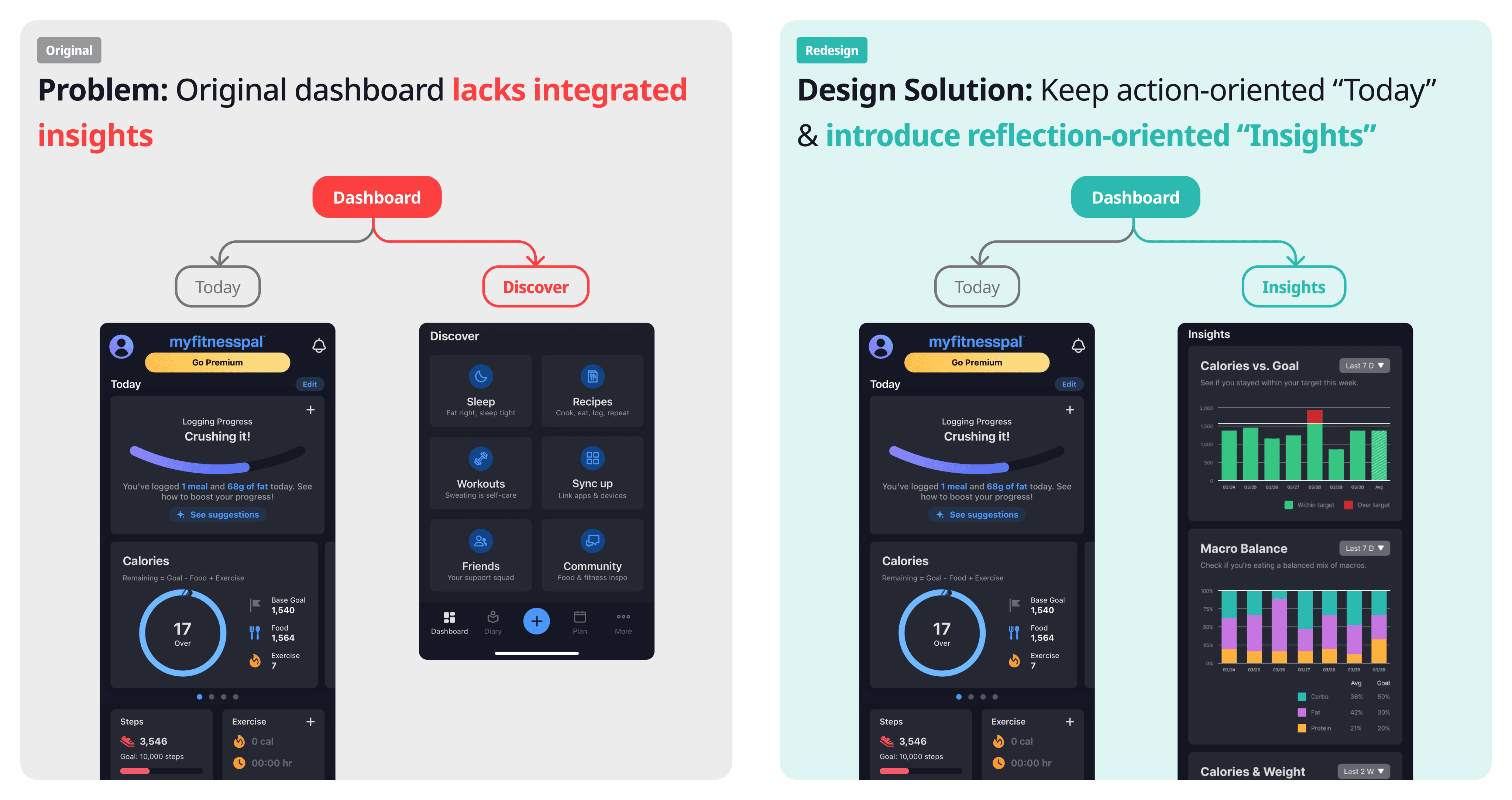
The original dashboard was divided into “Today” for logging and “Discover” for feature access. While functional, it offered little room for reflection. I restructured it by introducing a new “Insights” section — designed to complement “Today” with meaningful visualizations that help users notice trends, patterns, and progress over time.
The original dashboard was divided into “Today” for logging and “Discover” for feature access. While functional, it offered little room for reflection. I restructured it by introducing a new “Insights” section — designed to complement “Today” with meaningful visualizations that help users notice trends, patterns, and progress over time.
02 Insights Visualization: Designing Structured Insights to Support Reflection
02 Insights Visualization: Designing Structured Insights to Support Reflection
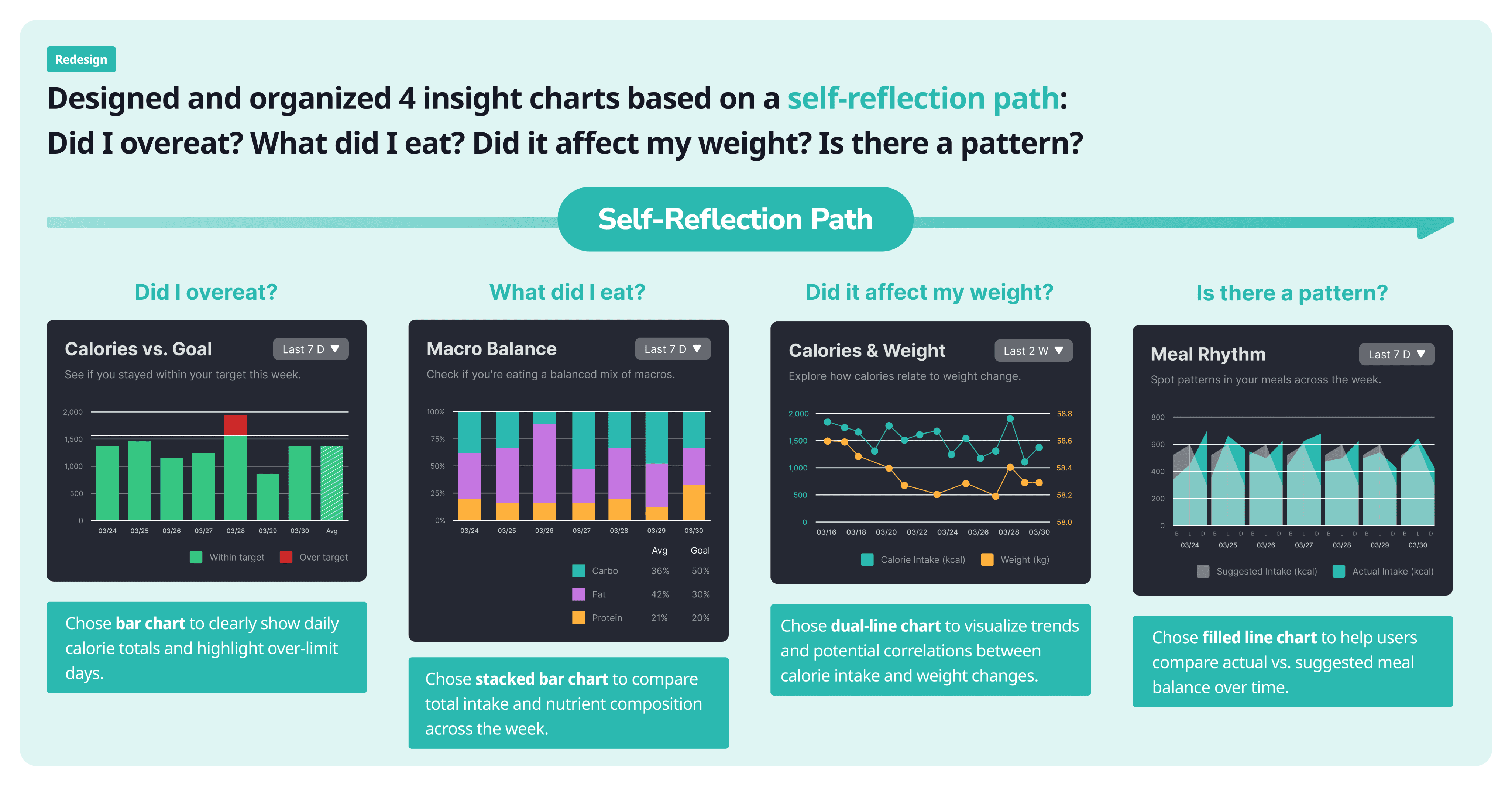
To support reflection, I structured the “Insights” section around a clear self-reflection path — guiding users through four key questions: Did I overeat? What did I eat? Did it affect my weight? Is there a pattern?
To support reflection, I structured the “Insights” section around a clear self-reflection path — guiding users through four key questions: Did I overeat? What did I eat? Did it affect my weight? Is there a pattern?
Each chart was deliberately chosen to visualize these questions clearly: bar charts for calorie comparisons, stacked bars for macro balance, dual-line charts for correlations, and filled line charts for rhythm patterns. Together, they transform abstract data into an intuitive narrative of daily habits.
Each chart was deliberately chosen to visualize these questions clearly: bar charts for calorie comparisons, stacked bars for macro balance, dual-line charts for correlations, and filled line charts for rhythm patterns. Together, they transform abstract data into an intuitive narrative of daily habits.
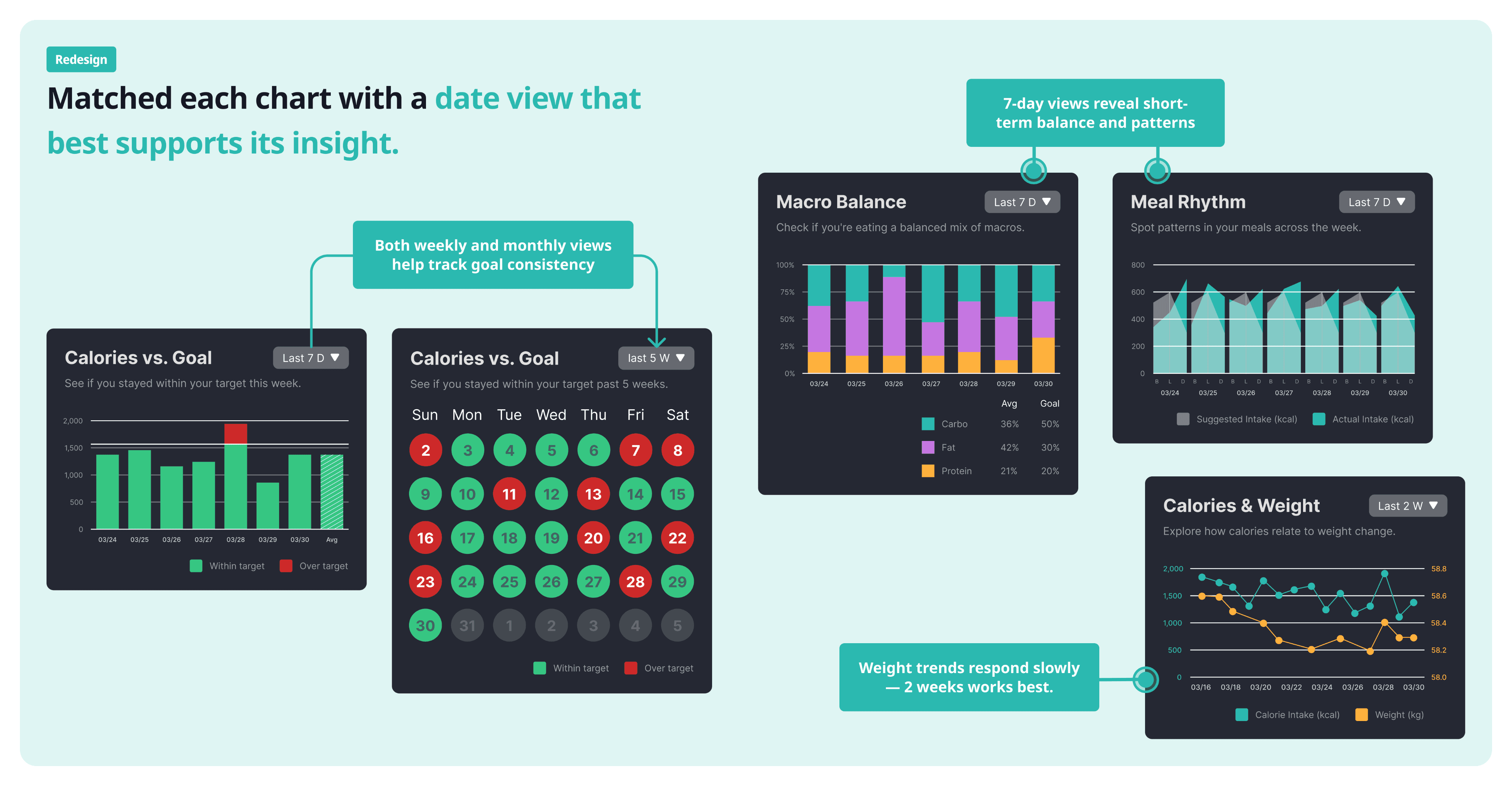
Beyond visualization type, I also matched each chart with a date view that best supports its insight. Short-term charts like Macro Balance and Meal Rhythm use a 7-day view to reveal daily balance and patterns, while longer-term charts like Calories vs. Goal and Calories & Weight include weekly or bi-weekly views to highlight consistency and gradual trends. This flexibility makes reflection more contextual and meaningful.
Beyond visualization type, I also matched each chart with a date view that best supports its insight. Short-term charts like Macro Balance and Meal Rhythm use a 7-day view to reveal daily balance and patterns, while longer-term charts like Calories vs. Goal and Calories & Weight include weekly or bi-weekly views to highlight consistency and gradual trends. This flexibility makes reflection more contextual and meaningful.
03 Nutritional Progress Feedback Redesign: Making Data More Actionable
03 Nutritional Progress Feedback Redesign: Making Data More Actionable
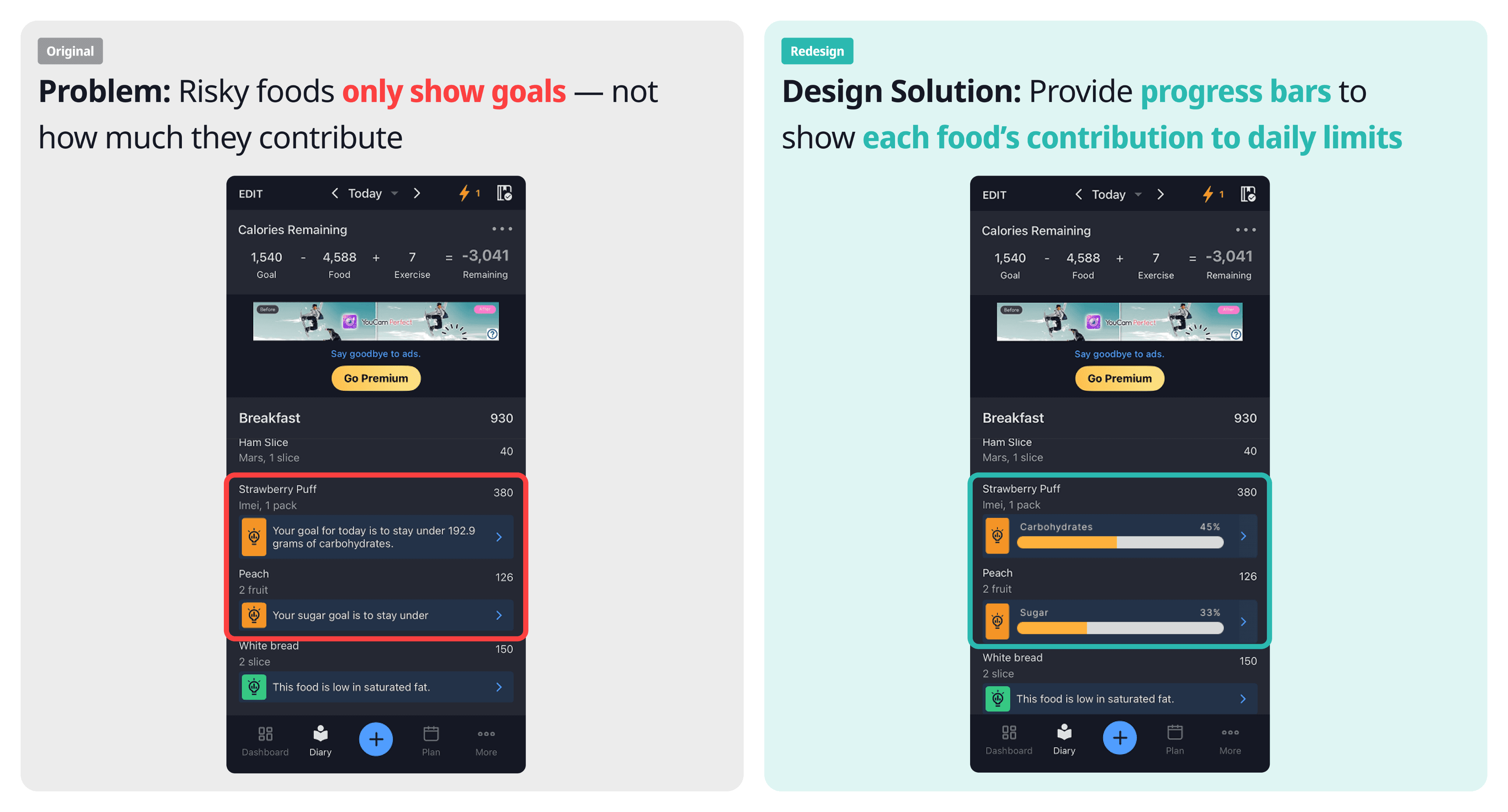
MyFitnessPal already alerts users when certain nutrients exceed limits, but the feedback is text-heavy and unclear — users know what is wrong, but not why. I redesigned the feedback system to visualize each food’s contribution through progress bars, highlighting nutrients nearing limits while keeping low-risk foods subtle. This makes the alerts more intuitive and actionable.
MyFitnessPal already alerts users when certain nutrients exceed limits, but the feedback is text-heavy and unclear — users know what is wrong, but not why. I redesigned the feedback system to visualize each food’s contribution through progress bars, highlighting nutrients nearing limits while keeping low-risk foods subtle. This makes the alerts more intuitive and actionable.
Together, these redesigns bridge reflection and action — helping users not only track their habits, but understand and respond to them with clarity and confidence.
Together, these redesigns bridge reflection and action — helping users not only track their habits, but understand and respond to them with clarity and confidence.
3. Project Details
01 What the app does
MyFitnessPal is one of the most widely used nutrition tracking apps, known for its large food database, barcode scanning, and calorie/macro tracking features. It also integrates with fitness devices, offering users a way to connect diet, exercise, and weight management.
02 Our user perspective
We approached MyFitnessPal as busy graduate students with limited nutrition knowledge but clear health goals:
Manage weight through balanced nutrition and regular activity
Develop awareness of eating patterns
Build a sustainable logging habit without adding mental load
Over 4 weeks of daily use, we saw a clear split between what worked and what didn’t.
03 Stage-Based Assessment of MyFitnessPal
Our evaluation using the Stage-Based Model shows that MyFitnessPal performs strongly in the early stages—Preparation, Collection, and Integration—but provides limited support for Reflection and Action, where users need insights and guidance to change behavior.
Where It Works
01
Preparation
Quick onboarding and goal presets lower the start barrier.
Notifications nudge logging without being intrusive.
02
Collection
Large database + barcode → fast, reliable search.
Shortcuts (Copy Previous Meal / My Meals) reduce repeat input.
Gesture navigation in the diary keeps flow efficient.
03
Integration
Auto totals for calories and macros; weekly/monthly rollups.
Clear separation of goal / food / exercise contributions.
Where It Breaks
04
Reflection
Homepage lacks insightful visualizations beyond basic numbers.
No charts that connect different metrics (e.g., intake vs. weight).
Users are left without clear guidance on how eating patterns actually impact outcomes.
05
Action
Nutrient goals show progress, but each food’s contribution to limits is invisible → hard to decide what to cut/keep.
Few cues that translate data into next best actions.
Bridging Reflection & Action
While MyFitnessPal excels at logging, it falls short in helping users reflect on patterns and take meaningful action. This gap led us to ask:
How might visualization & feedback be redesigned to better support Reflection & Action in nutrition tracking?
01 How do other nutrition apps support Reflection & Action?
We evaluated competitor apps (Cronometer, Lose It!, MyNetDiary) to understand how visualization and feedback are designed to help users reflect on patterns and take action. While none of them fully solved the challenge, each offered design cues worth learning from.
Cronometer
Advantage
Insightful Vis on Dashboard
Vis & Date Range Flexibility
Nutritional Progress Feedback
Lose It!
Advantage
Insightful Vis on Dashboard
Vis & Date Range Flexibility
MyNetDiary
Advantage
Insightful Vis on Dashboard
1. Insightful Visualizations on Dashboard
The homepage should provide at-a-glance insights like a macro breakdown.
MyFitnessPal: Only shows calories, no integrated chart.
Others: Provide macro breakdowns, but still mostly micro-level views, lacking connections across metrics.
2. Visualizations & Date Range Flexibility
Effective reflection requires flexible time views.
Lose It!: Allows switching from daily to weekly views directly on the dashboard.
Cronometer: Provides a clear date range menu under each chart.
3. Nutritional Progress Feedback
Effective feedback should help users understand how each logged food impacts their goals.
MyFitnessPal only restates generic daily targets (e.g., “stay under 192.9g carbs”), without showing how an individual food item contributes to those targets. This leaves users uncertain about what to adjust.
Cronometer, on the other hand, breaks down each food’s macronutrient contribution relative to the user’s goals. By visualizing percentages and highlighting imbalances, it enables users to reflect and take concrete next steps.
02 Lessons We Learned
1
Visualizations should deliver insights, not just numbers
Charts need to go beyond raw data and reveal meaningful relationships (e.g., intake vs. weight) that help users reflect.
2
Date views must be flexible and intuitive
Switching between daily, weekly, and monthly perspectives should be tied directly to the chart, making trend exploration seamless.
3
Feedback should translate data into action
Instead of generic progress bars, feedback should highlight overconsumption, suggest adjustments, and nudge users toward concrete next steps.
From Findings to Design: Bridging Reflection and Action
To address the three main pain points identified from our analysis, we focused our redesign on two key areas — Dashboard and Feedback Mechanism.
Dashboard Redesign shifts from action-oriented logging to insight-driven reflection, introducing clearer structure and meaningful visualizations.
Feedback Mechanism Redesign transforms raw nutritional data into actionable feedback, helping users make informed daily adjustments.
01 Dashboard Restructure: From Action to Insight
The original dashboard was divided into “Today” for logging and “Discover” for feature access. While functional, it offered little room for reflection. I restructured it by introducing a new “Insights” section — designed to complement “Today” with meaningful visualizations that help users notice trends, patterns, and progress over time.
02 Insights Visualization: Designing Structured Insights to Support Reflection
To support reflection, I structured the “Insights” section around a clear self-reflection path — guiding users through four key questions: Did I overeat? What did I eat? Did it affect my weight? Is there a pattern?
Each chart was deliberately chosen to visualize these questions clearly: bar charts for calorie comparisons, stacked bars for macro balance, dual-line charts for correlations, and filled line charts for rhythm patterns. Together, they transform abstract data into an intuitive narrative of daily habits.
Beyond visualization type, I also matched each chart with a date view that best supports its insight. Short-term charts like Macro Balance and Meal Rhythm use a 7-day view to reveal daily balance and patterns, while longer-term charts like Calories vs. Goal and Calories & Weight include weekly or bi-weekly views to highlight consistency and gradual trends. This flexibility makes reflection more contextual and meaningful.
03 Nutritional Progress Feedback Redesign: Making Data More Actionable
MyFitnessPal already alerts users when certain nutrients exceed limits, but the feedback is text-heavy and unclear — users know what is wrong, but not why. I redesigned the feedback system to visualize each food’s contribution through progress bars, highlighting nutrients nearing limits while keeping low-risk foods subtle. This makes the alerts more intuitive and actionable.
Together, these redesigns bridge reflection and action — helping users not only track their habits, but understand and respond to them with clarity and confidence.
4. Reflection
4. Reflection
4. Reflection
This project was more than just redesigning a health-tracking interface — it also deepened my understanding of how data, behavior, and visualization connect to real user reflection. Through it, I learned to make design choices that are both evidence-based and empathetic.
This project was more than just redesigning a health-tracking interface — it also deepened my understanding of how data, behavior, and visualization connect to real user reflection. Through it, I learned to make design choices that are both evidence-based and empathetic.
This project was more than just redesigning a health-tracking interface — it also deepened my understanding of how data, behavior, and visualization connect to real user reflection. Through it, I learned to make design choices that are both evidence-based and empathetic.
1
1
1
Grounding Design in Behavioral Frameworks
Grounding Design in Behavioral Frameworks
Grounding Design in Behavioral Frameworks
Using the Stage-Based Assessment framework helped me move beyond surface-level UI critique. It guided me to analyze how each feature supports users’ behavior change — from awareness to action — making every redesign decision more structured and purposeful.
Using the Stage-Based Assessment framework helped me move beyond surface-level UI critique. It guided me to analyze how each feature supports users’ behavior change — from awareness to action — making every redesign decision more structured and purposeful.
Using the Stage-Based Assessment framework helped me move beyond surface-level UI critique. It guided me to analyze how each feature supports users’ behavior change — from awareness to action — making every redesign decision more structured and purposeful.
2
2
2
Designing Visualization with Purpose and Context
Designing Visualization with Purpose and Context
Designing Visualization with Purpose and Context
I learned that good visualization starts with clarity of purpose. Each chart should tell a story and fit its context — the data, the reflection goal, and the mobile format. Balancing information richness with simplicity taught me how to make visual insights both meaningful and easy to grasp.
I learned that good visualization starts with clarity of purpose. Each chart should tell a story and fit its context — the data, the reflection goal, and the mobile format. Balancing information richness with simplicity taught me how to make visual insights both meaningful and easy to grasp.
I learned that good visualization starts with clarity of purpose. Each chart should tell a story and fit its context — the data, the reflection goal, and the mobile format. Balancing information richness with simplicity taught me how to make visual insights both meaningful and easy to grasp.
3
3
3
Connecting Reflection and Action Through Design
Connecting Reflection and Action Through Design
Connecting Reflection and Action Through Design
This project showed me that reflection alone isn’t enough; users also need clear cues for what to do next. Designing both the “Insights” and “Feedback” features helped me see how thoughtful information design can bridge awareness and everyday action.
This project showed me that reflection alone isn’t enough; users also need clear cues for what to do next. Designing both the “Insights” and “Feedback” features helped me see how thoughtful information design can bridge awareness and everyday action.
This project showed me that reflection alone isn’t enough; users also need clear cues for what to do next. Designing both the “Insights” and “Feedback” features helped me see how thoughtful information design can bridge awareness and everyday action.
Other Works

Other Works
Other Works
Other Works