CirclePass: Co-Designing with Generative AI to Improve Shared Account Access
CirclePass: Co-Designing with Generative AI to Improve Shared Account Access
CirclePass: Co-Designing with Generative AI to Improve Shared Account Access
A user-centered design project to improve shared account access by co-creating with ChatGPT. This case study explores how generative AI can support design research, ideation, and iteration.
A user-centered design project to improve shared account access by co-creating with ChatGPT. This case study explores how generative AI can support design research, ideation, and iteration.
A user-centered design project to improve shared account access by co-creating with ChatGPT. This case study explores how generative AI can support design research, ideation, and iteration.
Role
Role
Role
Solo Designer (Research + UI/UX)
Solo Designer (Research + UI/UX)
Solo Designer (Research + UI/UX)
Timeline
Timeline
Timeline
Oct 2024 – Dec 2025
Oct 2024 – Dec 2025
Oct 2024 – Dec 2025
Tools
Tools
Tools
ChatGPT, Figma
ChatGPT, Figma
ChatGPT, Figma
1. Project Context
1. Project Context
This solo term project, CirclePass, was created for the Generative AI in UX course at the University of Maryland. Unlike traditional UX case studies that aim to deliver a polished product, the main focus here was to explore how generative AI can support different stages of the UX process — from ideation and research to design and iteration.
This solo term project, CirclePass, was created for the Generative AI in UX course at the University of Maryland. Unlike traditional UX case studies that aim to deliver a polished product, the main focus here was to explore how generative AI can support different stages of the UX process — from ideation and research to design and iteration.
I chose the topic of shared account access based on my personal interest in improving how people manage access and permissions when using the same digital service — a challenge common in everyday life but often overlooked in design. This topic became a testing ground for experimenting with how tools like ChatGPT can shape design thinking, spark ideas, or even simulate collaboration in a solo workflow.
I chose the topic of shared account access based on my personal interest in improving how people manage access and permissions when using the same digital service — a challenge common in everyday life but often overlooked in design. This topic became a testing ground for experimenting with how tools like ChatGPT can shape design thinking, spark ideas, or even simulate collaboration in a solo workflow.
Although CirclePass does include user-centered thinking, the priority was to reflect critically on AI’s role in UX work — understanding not just how AI can help, but also where its limitations lie. The following sections break down how I collaborated with AI throughout each stage of the project.
Although CirclePass does include user-centered thinking, the priority was to reflect critically on AI’s role in UX work — understanding not just how AI can help, but also where its limitations lie. The following sections break down how I collaborated with AI throughout each stage of the project.
1. Project Context
This solo term project, CirclePass, was created for the Generative AI in UX course at the University of Maryland. Unlike traditional UX case studies that aim to deliver a polished product, the main focus here was to explore how generative AI can support different stages of the UX process — from ideation and research to design and iteration.
I chose the topic of shared account access based on my personal interest in improving how people manage access and permissions when using the same digital service — a challenge common in everyday life but often overlooked in design. This topic became a testing ground for experimenting with how tools like ChatGPT can shape design thinking, spark ideas, or even simulate collaboration in a solo workflow.
Although CirclePass does include user-centered thinking, the priority was to reflect critically on AI’s role in UX work — understanding not just how AI can help, but also where its limitations lie. The following sections break down how I collaborated with AI throughout each stage of the project.
2. How I Used AI in CirclePass
2. How I Used AI in CirclePass
2. How I Used AI in CirclePass
To better understand how generative AI can act as a design partner, I documented not just what I made, but how I worked with it. The two sections below highlight my collaboration with ChatGPT—from big-picture patterns of contribution to the prompting strategies that kept my process focused and creative.
To better understand how generative AI can act as a design partner, I documented not just what I made, but how I worked with it. The two sections below highlight my collaboration with ChatGPT—from big-picture patterns of contribution to the prompting strategies that kept my process focused and creative.
To better understand how generative AI can act as a design partner, I documented not just what I made, but how I worked with it. The two sections below highlight my collaboration with ChatGPT—from big-picture patterns of contribution to the prompting strategies that kept my process focused and creative.
01 Contribution Summary: research fueled by ChatGPT, design led by me, iterations co-driven
01 Contribution Summary: research fueled by ChatGPT, design led by me, iterations co-driven
01 Contribution Summary: research fueled by ChatGPT, design led by me, iterations co-driven
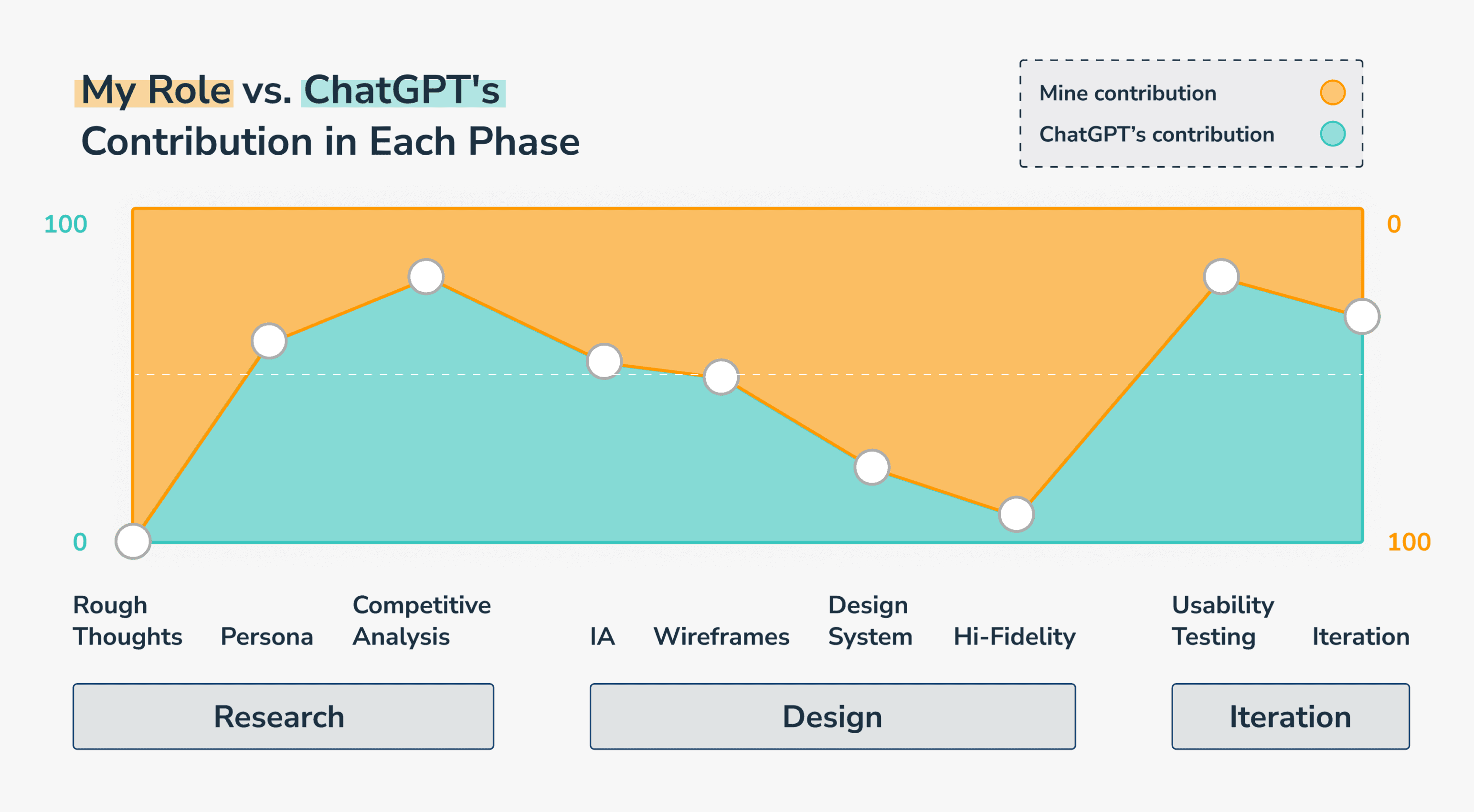
To explore how generative AI could shape each phase of UX work, I tracked how much ChatGPT contributed vs. how much I led throughout the project. As shown in the graph, AI was especially helpful in early-stage research and late-stage iteration, while I took the lead in design execution. This highlights that while AI can assist with ideation and refinement, designers remain irreplaceable when it comes to creativity, empathy, and context-driven decisions.
To explore how generative AI could shape each phase of UX work, I tracked how much ChatGPT contributed vs. how much I led throughout the project. As shown in the graph, AI was especially helpful in early-stage research and late-stage iteration, while I took the lead in design execution. This highlights that while AI can assist with ideation and refinement, designers remain irreplaceable when it comes to creativity, empathy, and context-driven decisions.
To explore how generative AI could shape each phase of UX work, I tracked how much ChatGPT contributed vs. how much I led throughout the project. As shown in the graph, AI was especially helpful in early-stage research and late-stage iteration, while I took the lead in design execution. This highlights that while AI can assist with ideation and refinement, designers remain irreplaceable when it comes to creativity, empathy, and context-driven decisions.
02 Tactics for Effective AI Collaboration
02 Tactics for Effective AI Collaboration
02 Tactics for Effective AI Collaboration
Along the way, I developed strategies to get the most out of ChatGPT. Rather than treating it as a magic box, I approached it like a collaborator that needed context, structure, and feedback:
Along the way, I developed strategies to get the most out of ChatGPT. Rather than treating it as a magic box, I approached it like a collaborator that needed context, structure, and feedback:
Along the way, I developed strategies to get the most out of ChatGPT. Rather than treating it as a magic box, I approached it like a collaborator that needed context, structure, and feedback:
1
1
1
Give clear, full context
Give clear, full context
Give clear, full context
I learned to provide complete background info—project goals, audience, constraints—to get relevant and actionable outputs.
I learned to provide complete background info—project goals, audience, constraints—to get relevant and actionable outputs.
I learned to provide complete background info—project goals, audience, constraints—to get relevant and actionable outputs.
2
2
2
Ask for 3–5 options, not too many
Ask for 3–5 options, not too many
Ask for 3–5 options, not too many
To avoid being overwhelmed, I asked ChatGPT to return a small set of ideas (like 3 use cases or wireframe options) rather than a firehose of suggestions.
To avoid being overwhelmed, I asked ChatGPT to return a small set of ideas (like 3 use cases or wireframe options) rather than a firehose of suggestions.
To avoid being overwhelmed, I asked ChatGPT to return a small set of ideas (like 3 use cases or wireframe options) rather than a firehose of suggestions.
3
3
3
Use visuals in prompts
Use visuals in prompts
Use visuals in prompts
When asking for prioritization or categorization, I used things like 🟢🟡🔴 or tables instead of paragraphs, which helped me quickly digest complex info.
When asking for prioritization or categorization, I used things like 🟢🟡🔴 or tables instead of paragraphs, which helped me quickly digest complex info.
When asking for prioritization or categorization, I used things like 🟢🟡🔴 or tables instead of paragraphs, which helped me quickly digest complex info.
4
4
4
Iterate with feedback
Iterate with feedback
Iterate with feedback
Rather than accepting the first answer, I refined outputs with prompts like “Make this layout simpler” or “What if this user has low digital literacy?”
Rather than accepting the first answer, I refined outputs with prompts like “Make this layout simpler” or “What if this user has low digital literacy?”
Rather than accepting the first answer, I refined outputs with prompts like “Make this layout simpler” or “What if this user has low digital literacy?”
These strategies helped me stay in control while letting AI assist with idea generation, reframing, and even small moments of co-creation.
These strategies helped me stay in control while letting AI assist with idea generation, reframing, and even small moments of co-creation.
These strategies helped me stay in control while letting AI assist with idea generation, reframing, and even small moments of co-creation.
3. Project Details
3. Project Details
CirclePass: Password-Free Sharing for Real-Life Account Scenarios
CirclePass: Password-Free Sharing for Real-Life Account Scenarios
Many of us have shared streaming accounts before—often with people who aren’t in the same household. That’s when things get messy. CirclePass tries to solve this problem by simplifying how we share accounts—without the mess of passwords.
Many of us have shared streaming accounts before—often with people who aren’t in the same household. That’s when things get messy. CirclePass tries to solve this problem by simplifying how we share accounts—without the mess of passwords.
Problem
Problem
Sharing accounts like Netflix often involves acquaintances or friends rather than close family, creating challenges:
Sharing accounts like Netflix often involves acquaintances or friends rather than close family, creating challenges:
😣
😣
Owners frequently update passwords for security but struggle to notify members
Owners frequently update passwords for security but struggle to notify members
😣
😣
Participants get locked out due to password changes
Participants get locked out due to password changes
😣
😣
Guests lack a secure way to access temporarily
Guests lack a secure way to access temporarily
Solution
Solution
CirclePass simplifies and secures account sharing by:
CirclePass simplifies and secures account sharing by:
🤩
🤩
Using QR Codes to avoid sharing passwords
Using QR Codes to avoid sharing passwords
🤩
🤩
Allowing easy management of Participants and Guests
Allowing easy management of Participants and Guests
🤩
🤩
Automating notifications and
re-verifications
Automating notifications and
re-verifications
01 Persona
01 Persona
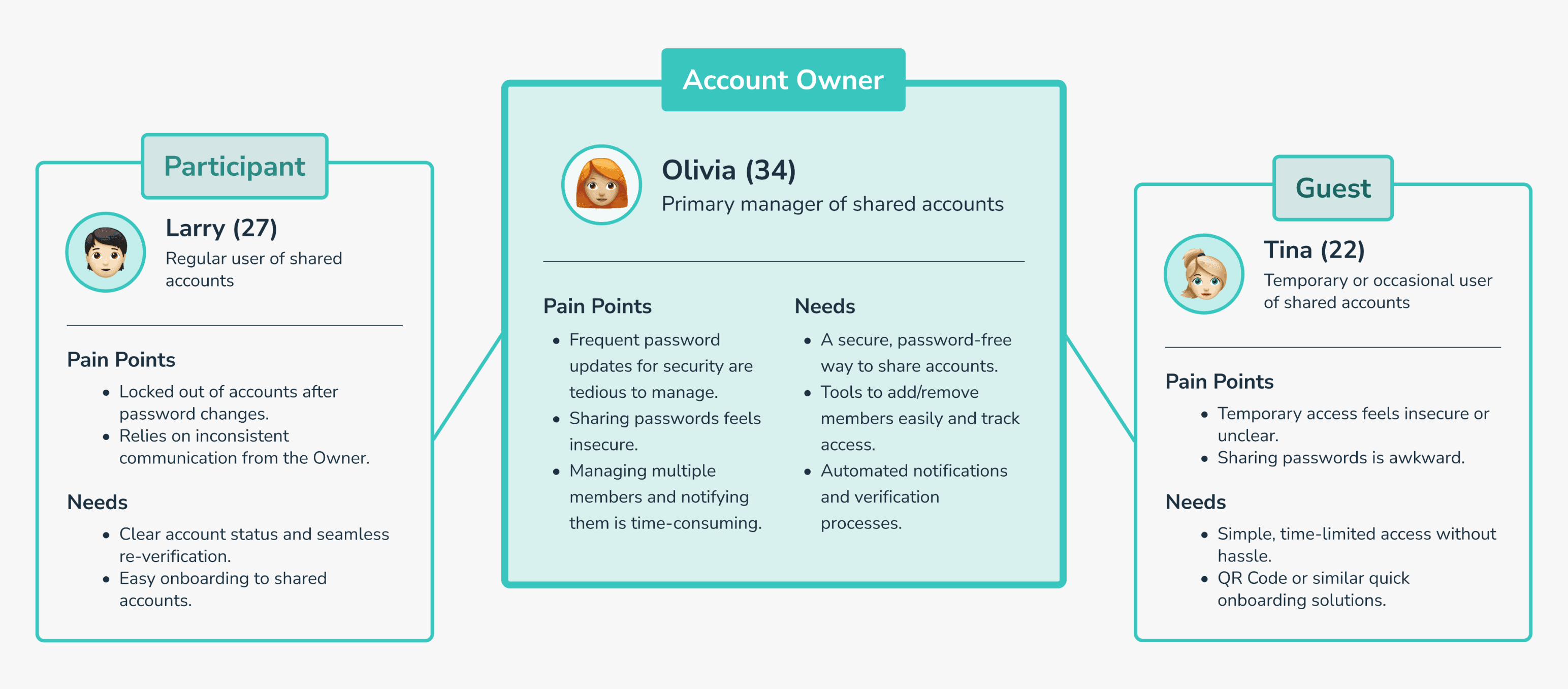
I segmented users into three roles—Account Owner, Participant, and Guest—helped surface distinct needs and frictions around shared access. While Participants and Guests often face access or clarity issues, Account Owners bear the cognitive load of managing and securing multiple users. This led me to focus on Owners as the primary design driver—designing tools that would not only help them, but indirectly improve the experience for everyone in the sharing circle.
I segmented users into three roles—Account Owner, Participant, and Guest—helped surface distinct needs and frictions around shared access. While Participants and Guests often face access or clarity issues, Account Owners bear the cognitive load of managing and securing multiple users. This led me to focus on Owners as the primary design driver—designing tools that would not only help them, but indirectly improve the experience for everyone in the sharing circle.
💡 How I collaborated with Gen AI?
💡 How I collaborated with Gen AI?
Define
Define
Expand
Expand
ChatGPT helped me turn vague user frustrations into distinct, multi-faceted personas, which I then refined for alignment with the product's goals.
ChatGPT helped me turn vague user frustrations into distinct, multi-faceted personas, which I then refined for alignment with the product's goals.
02 Competitor Analysis
02 Competitor Analysis
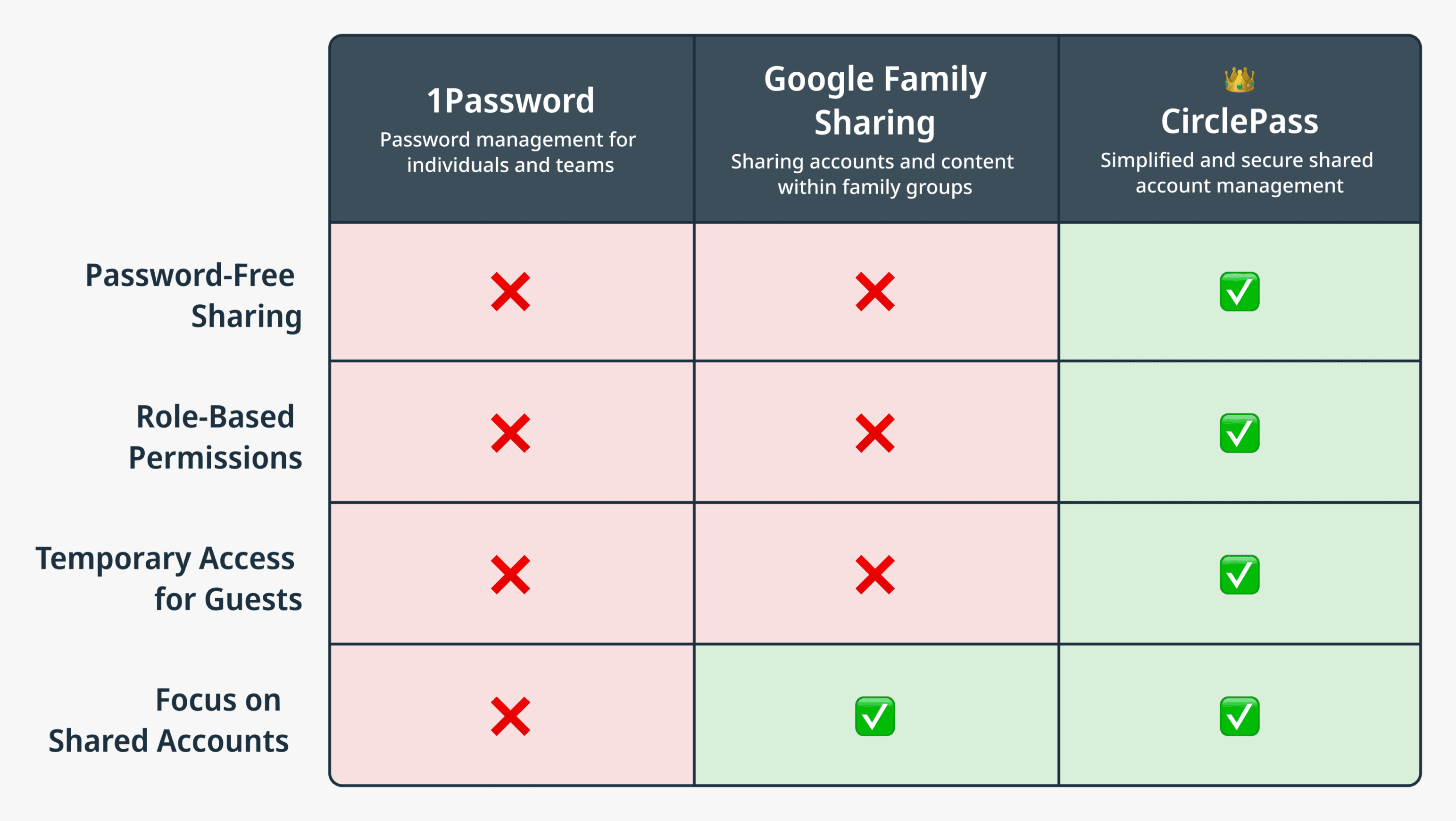
While many tools either focus on storing personal passwords (like 1Password) or enabling basic family sharing (like Google Family Sharing), CirclePass fills a unique gap: real-life shared accounts among friends, couples, and roommates.
While many tools either focus on storing personal passwords (like 1Password) or enabling basic family sharing (like Google Family Sharing), CirclePass fills a unique gap: real-life shared accounts among friends, couples, and roommates.
Designed with roles and access logic built-in, CirclePass eliminates password fatigue and awkward workarounds—making shared usage smoother, safer, and more respectful of different access needs. The table below shows how CirclePass compares to these existing tools based on four key criteria.
Designed with roles and access logic built-in, CirclePass eliminates password fatigue and awkward workarounds—making shared usage smoother, safer, and more respectful of different access needs. The table below shows how CirclePass compares to these existing tools based on four key criteria.
💡 How I collaborated with Gen AI?
💡 How I collaborated with Gen AI?
Define
Define
Organize
Organize
ChatGPT identified relevant competitors and organized structured comparisons based on my evaluation criteria, making the analysis clearer and more focused.
ChatGPT identified relevant competitors and organized structured comparisons based on my evaluation criteria, making the analysis clearer and more focused.
01 MVP Features
01 MVP Features
CirclePass is built around four core features—selected for their technical feasibility and user value during early exploration.
CirclePass is built around four core features—selected for their technical feasibility and user value during early exploration.
💡 How I collaborated with Gen AI?
💡 How I collaborated with Gen AI?
Brainstorm
Brainstorm
Validate
Validate
ChatGPT helped generate a wide range of use cases and analyzed their feasibility and importance, helping me prioritize the four main MVP features.
ChatGPT helped generate a wide range of use cases and analyzed their feasibility and importance, helping me prioritize the four main MVP features.
Password-Free Sharing
Password-Free Sharing
Share accounts securely via QR codes—no passwords required.
Share accounts securely via QR codes—no passwords required.
Role-Based Permissions
Role-Based Permissions
Assign roles with custom access for owners, participants, and guests.
Assign roles with custom access for owners, participants, and guests.
Temporary Access for Guests
Temporary Access for Guests
Let guests join temporarily with clear expiration rules.
Let guests join temporarily with clear expiration rules.
Automated Notifications
Automated Notifications
Send updates and reminders when access or passwords change.
Send updates and reminders when access or passwords change.
02 Design System
02 Design System
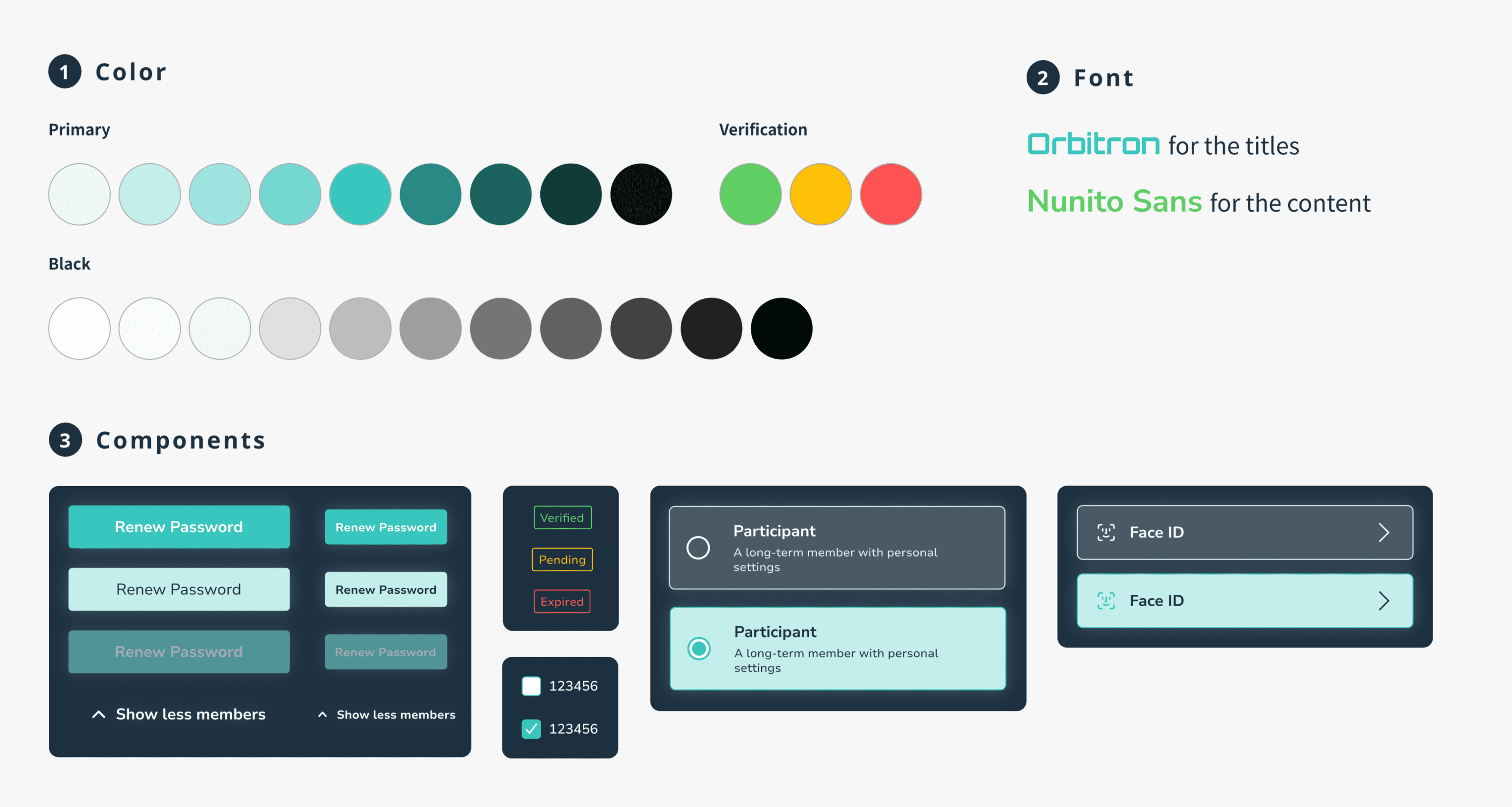
To ensure a consistent and trustworthy interface, I established a design system centered around clarity, security, and flexibility across roles.
To ensure a consistent and trustworthy interface, I established a design system centered around clarity, security, and flexibility across roles.
💡 How I collaborated with Gen AI?
💡 How I collaborated with Gen AI?
Brainstorm
Brainstorm
ChatGPT generated palettes, fonts, and mood boards aligned with my brand, which I used as inspiration while leading the final design decisions.
ChatGPT generated palettes, fonts, and mood boards aligned with my brand, which I used as inspiration while leading the final design decisions.
03 Hi-Fi
03 Hi-Fi
To reflect real-world needs, I designed four key use cases: (1) Adding a new participant, (2) Adding a temporary guest, (3) Managing members, and (4) Renewing passwords with re-verification. These scenarios shaped the flows and interface logic across different user roles.
To reflect real-world needs, I designed four key use cases: (1) Adding a new participant, (2) Adding a temporary guest, (3) Managing members, and (4) Renewing passwords with re-verification. These scenarios shaped the flows and interface logic across different user roles.
💡 How I collaborated with Gen AI?
💡 How I collaborated with Gen AI?
Define
Define
ChatGPT helped transform use cases into detailed flows and page structures, providing wireframe concepts to guide my design process.
ChatGPT helped transform use cases into detailed flows and page structures, providing wireframe concepts to guide my design process.
Use Case 1
Use Case 1
Owner Adding a New Participant
Owner Adding a New Participant
Owners can add long-term members (Participants) to their accounts by sending an invitation via QR code or link. Participants receive a clear, step-by-step interface to accept the invitation and access the account.
Owners can add long-term members (Participants) to their accounts by sending an invitation via QR code or link. Participants receive a clear, step-by-step interface to accept the invitation and access the account.
Account Owner
Acc Owner
Participant
Participant
Account Owner
Acc Owner
Guest
Guest
Use Case 2
Use Case 2
Owner Adding a Temporary Guest
Owner Adding a Temporary Guest
Owners can grant temporary access by setting an expiration date and sharing a secure QR code. Guests can join the account directly via a web link, eliminating the need to download the app.
Owners can grant temporary access by setting an expiration date and sharing a secure QR code. Guests can join the account directly via a web link, eliminating the need to download the app.
Use Case 3
Use Case 3
Managing Members
Managing Members
Owners can efficiently manage all members by editing details, verifying status, or removing access. The interface provides clear member statuses (e.g., Verified, Pending, Expired) and allows for easy actions like sending verification reminders.
Owners can efficiently manage all members by editing details, verifying status, or removing access. The interface provides clear member statuses (e.g., Verified, Pending, Expired) and allows for easy actions like sending verification reminders.
Account Owner
Account Owner
Account Owner
Acc Owner
Participant
Participant
Use Case 4
Use Case 4
Password Renewal and Re-verification
Password Renewal and Re-verification
When an Owner updates the account password, all members are automatically notified to re-verify their access. The process includes secure options like Face ID, Email, or SMS, ensuring a seamless and secure experience for Participants.
When an Owner updates the account password, all members are automatically notified to re-verify their access. The process includes secure options like Face ID, Email, or SMS, ensuring a seamless and secure experience for Participants.
Iterating to Improve Guest Access Expiration Clarity
Iterating to Improve Guest Access Expiration Clarity
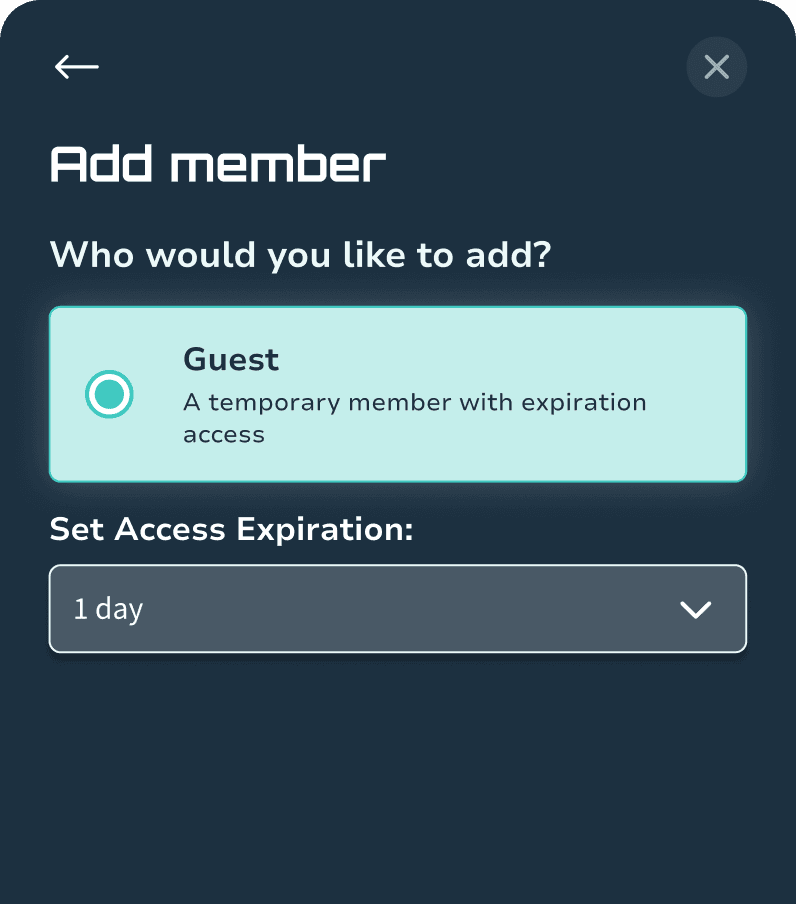
I focused on refining the "Set Access Expiration" interaction after identifying user confusion during simulated usability testing, especially among less tech-savvy users.
I focused on refining the "Set Access Expiration" interaction after identifying user confusion during simulated usability testing, especially among less tech-savvy users.
💡 How I collaborated with Gen AI?
💡 How I collaborated with Gen AI?
Simulate
Simulate
ChatGPT assisted in drafting the usability testing plan, simulating tests, and providing prioritized feedback.
ChatGPT assisted in drafting the usability testing plan, simulating tests, and providing prioritized feedback.
Expiration Selection Confusion
Expiration Selection Confusion
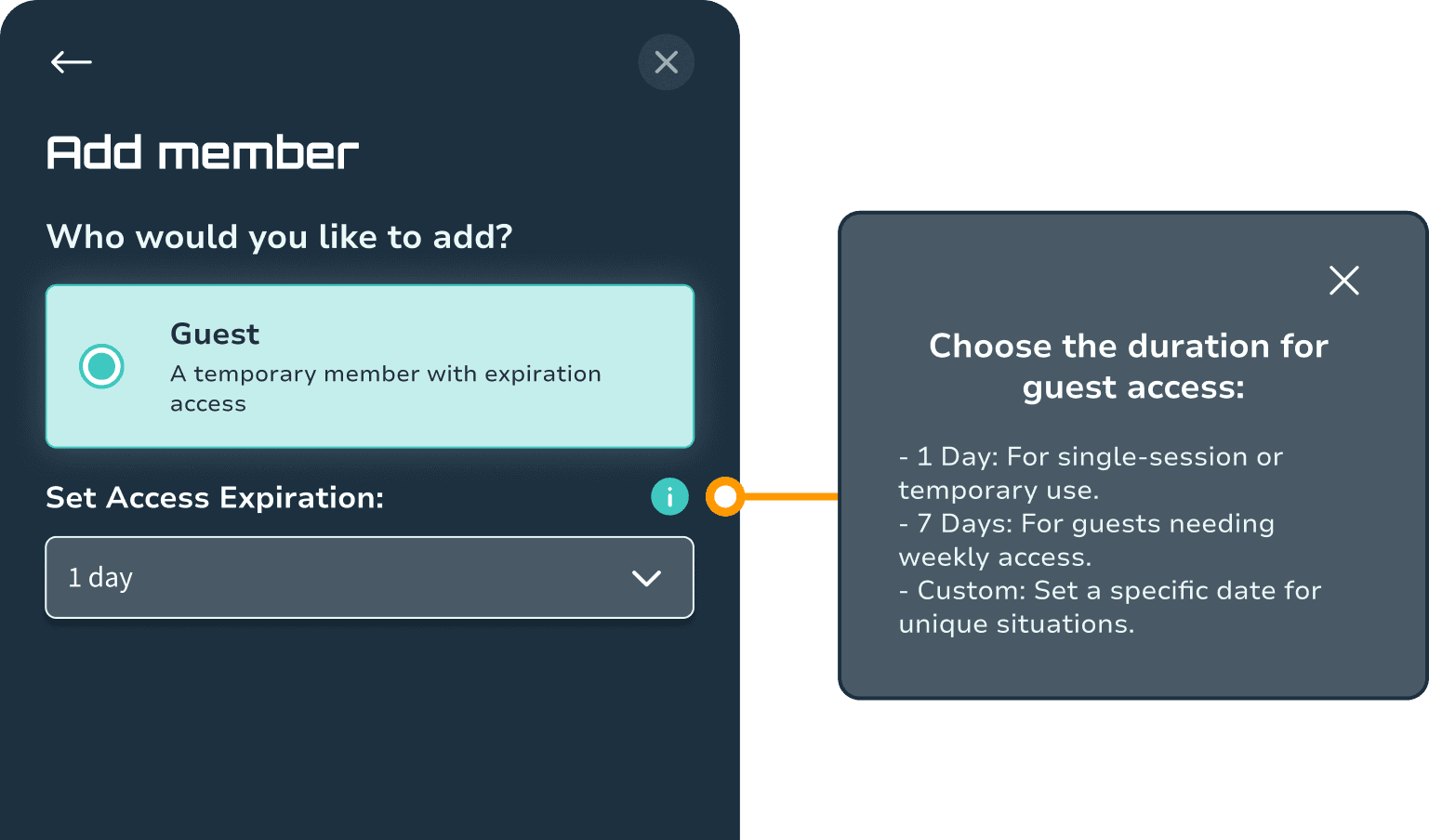
Users, especially less tech-savvy ones, struggle to understand the purpose of the "Set Access Expiration" options.
Users, especially less tech-savvy ones, struggle to understand the purpose of the "Set Access Expiration" options.
Solution
Solution
Added an i icon next to the dropdown, which opens a tooltip explaining the details
Added an i icon next to the dropdown, which opens a tooltip explaining the details
3. Project Details
CirclePass: Password-Free Sharing for Real-Life Account Scenarios
Many of us have shared streaming accounts before—often with people who aren’t in the same household. That’s when things get messy. CirclePass tries to solve this problem by simplifying how we share accounts—without the mess of passwords.
Problem
Sharing accounts like Netflix often involves acquaintances or friends rather than close family, creating challenges:
😣
Owners frequently update passwords for security but struggle to notify members
😣
Participants get locked out due to password changes
😣
Guests lack a secure way to access temporarily
Solution
CirclePass simplifies and secures account sharing by:
🤩
Using QR Codes to avoid sharing passwords
🤩
Allowing easy management of Participants and Guests
🤩
Automating notifications and
re-verifications
01 Persona
I segmented users into three roles—Account Owner, Participant, and Guest—helped surface distinct needs and frictions around shared access. While Participants and Guests often face access or clarity issues, Account Owners bear the cognitive load of managing and securing multiple users. This led me to focus on Owners as the primary design driver—designing tools that would not only help them, but indirectly improve the experience for everyone in the sharing circle.
💡 How I collaborated with Gen AI?
Define
Expand
ChatGPT helped me turn vague user frustrations into distinct, multi-faceted personas, which I then refined for alignment with the product's goals.
02 Competitor Analysis
While many tools either focus on storing personal passwords (like 1Password) or enabling basic family sharing (like Google Family Sharing), CirclePass fills a unique gap: real-life shared accounts among friends, couples, and roommates.
Designed with roles and access logic built-in, CirclePass eliminates password fatigue and awkward workarounds—making shared usage smoother, safer, and more respectful of different access needs. The table below shows how CirclePass compares to these existing tools based on four key criteria.
💡 How I collaborated with Gen AI?
Define
Organize
ChatGPT identified relevant competitors and organized structured comparisons based on my evaluation criteria, making the analysis clearer and more focused.
01 MVP Features
CirclePass is built around four core features—selected for their technical feasibility and user value during early exploration.
💡 How I collaborated with Gen AI?
Brainstorm
Validate
ChatGPT helped generate a wide range of use cases and analyzed their feasibility and importance, helping me prioritize the four main MVP features.
Password-Free Sharing
Share accounts securely via QR codes—no passwords required.
Role-Based Permissions
Assign roles with custom access for owners, participants, and guests.
Temporary Access for Guests
Let guests join temporarily with clear expiration rules.
Automated Notifications
Send updates and reminders when access or passwords change.
02 Design System
To ensure a consistent and trustworthy interface, I established a design system centered around clarity, security, and flexibility across roles.
💡 How I collaborated with Gen AI?
Brainstorm
ChatGPT generated palettes, fonts, and mood boards aligned with my brand, which I used as inspiration while leading the final design decisions.
03 Hi-Fi
To reflect real-world needs, I designed four key use cases: (1) Adding a new participant, (2) Adding a temporary guest, (3) Managing members, and (4) Renewing passwords with re-verification. These scenarios shaped the flows and interface logic across different user roles.
💡 How I collaborated with Gen AI?
Define
ChatGPT helped transform use cases into detailed flows and page structures, providing wireframe concepts to guide my design process.
Use Case 1
Owner Adding a New Participant
Owners can add long-term members (Participants) to their accounts by sending an invitation via QR code or link. Participants receive a clear, step-by-step interface to accept the invitation and access the account.
Account Owner
Participant
Account Owner
Guest
Use Case 2
Owner Adding a Temporary Guest
Owners can grant temporary access by setting an expiration date and sharing a secure QR code. Guests can join the account directly via a web link, eliminating the need to download the app.
Use Case 3
Managing Members
Owners can efficiently manage all members by editing details, verifying status, or removing access. The interface provides clear member statuses (e.g., Verified, Pending, Expired) and allows for easy actions like sending verification reminders.
Account Owner
Account Owner
Participant
Use Case 4
Password Renewal and Re-verification
When an Owner updates the account password, all members are automatically notified to re-verify their access. The process includes secure options like Face ID, Email, or SMS, ensuring a seamless and secure experience for Participants.
Iterating to Improve Guest Access Expiration Clarity
I focused on refining the "Set Access Expiration" interaction after identifying user confusion during simulated usability testing, especially among less tech-savvy users.
💡 How I collaborated with Gen AI?
Simulate
ChatGPT assisted in drafting the usability testing plan, simulating tests, and providing prioritized feedback.
Expiration Selection Confusion
Users, especially less tech-savvy ones, struggle to understand the purpose of the "Set Access Expiration" options.
Solution
Added an i icon next to the dropdown, which opens a tooltip explaining the details
4. Reflection
4. Reflection
4. Reflection
This project was more than just an exploration of interface design—it was also my first time intentionally working side-by-side with Generative AI from start to finish. Along the way, I picked up valuable lessons not only about design, but also about how to make the most of this new kind of collaborator.
This project was more than just an exploration of interface design—it was also my first time intentionally working side-by-side with Generative AI from start to finish. Along the way, I picked up valuable lessons not only about design, but also about how to make the most of this new kind of collaborator.
This project was more than just an exploration of interface design—it was also my first time intentionally working side-by-side with Generative AI from start to finish. Along the way, I picked up valuable lessons not only about design, but also about how to make the most of this new kind of collaborator.
1
1
1
Gaining Clarity on the Strengths of Myself vs. ChatGPT
Gaining Clarity on the Strengths of Myself vs. ChatGPT
Gaining Clarity on the Strengths of Myself vs. ChatGPT
Through this project, I gained a clearer understanding of what tasks I, as a designer, should take ownership of, and what parts AI can assist with. ChatGPT was great at quickly generating use cases, flows, and structural ideas to kickstart my thinking—but it was still up to me to decide if the flow made sense, whether the UI was clear, and how to adjust the details based on user needs and tone.
Through this project, I gained a clearer understanding of what tasks I, as a designer, should take ownership of, and what parts AI can assist with. ChatGPT was great at quickly generating use cases, flows, and structural ideas to kickstart my thinking—but it was still up to me to decide if the flow made sense, whether the UI was clear, and how to adjust the details based on user needs and tone.
Through this project, I gained a clearer understanding of what tasks I, as a designer, should take ownership of, and what parts AI can assist with. ChatGPT was great at quickly generating use cases, flows, and structural ideas to kickstart my thinking—but it was still up to me to decide if the flow made sense, whether the UI was clear, and how to adjust the details based on user needs and tone.
2
2
2
Learning How to Collaborate Differently at Each Stage
Learning How to Collaborate Differently at Each Stage
Learning How to Collaborate Differently at Each Stage
From early-stage use case breakdowns, to mid-stage wireframe and component structure suggestions, to late-stage simulated testing and iteration planning—this project helped me learn how to work with AI in different ways at different points. ChatGPT wasn’t just a search tool; it became a real collaborator in my design workflow.
From early-stage use case breakdowns, to mid-stage wireframe and component structure suggestions, to late-stage simulated testing and iteration planning—this project helped me learn how to work with AI in different ways at different points. ChatGPT wasn’t just a search tool; it became a real collaborator in my design workflow.
From early-stage use case breakdowns, to mid-stage wireframe and component structure suggestions, to late-stage simulated testing and iteration planning—this project helped me learn how to work with AI in different ways at different points. ChatGPT wasn’t just a search tool; it became a real collaborator in my design workflow.
While I still led the overall design, having ChatGPT as a collaborator made my process smoother and more efficient!
While I still led the overall design, having ChatGPT as a collaborator made my process smoother and more efficient!
While I still led the overall design, having ChatGPT as a collaborator made my process smoother and more efficient!
Other Works
Other Works


Other Works