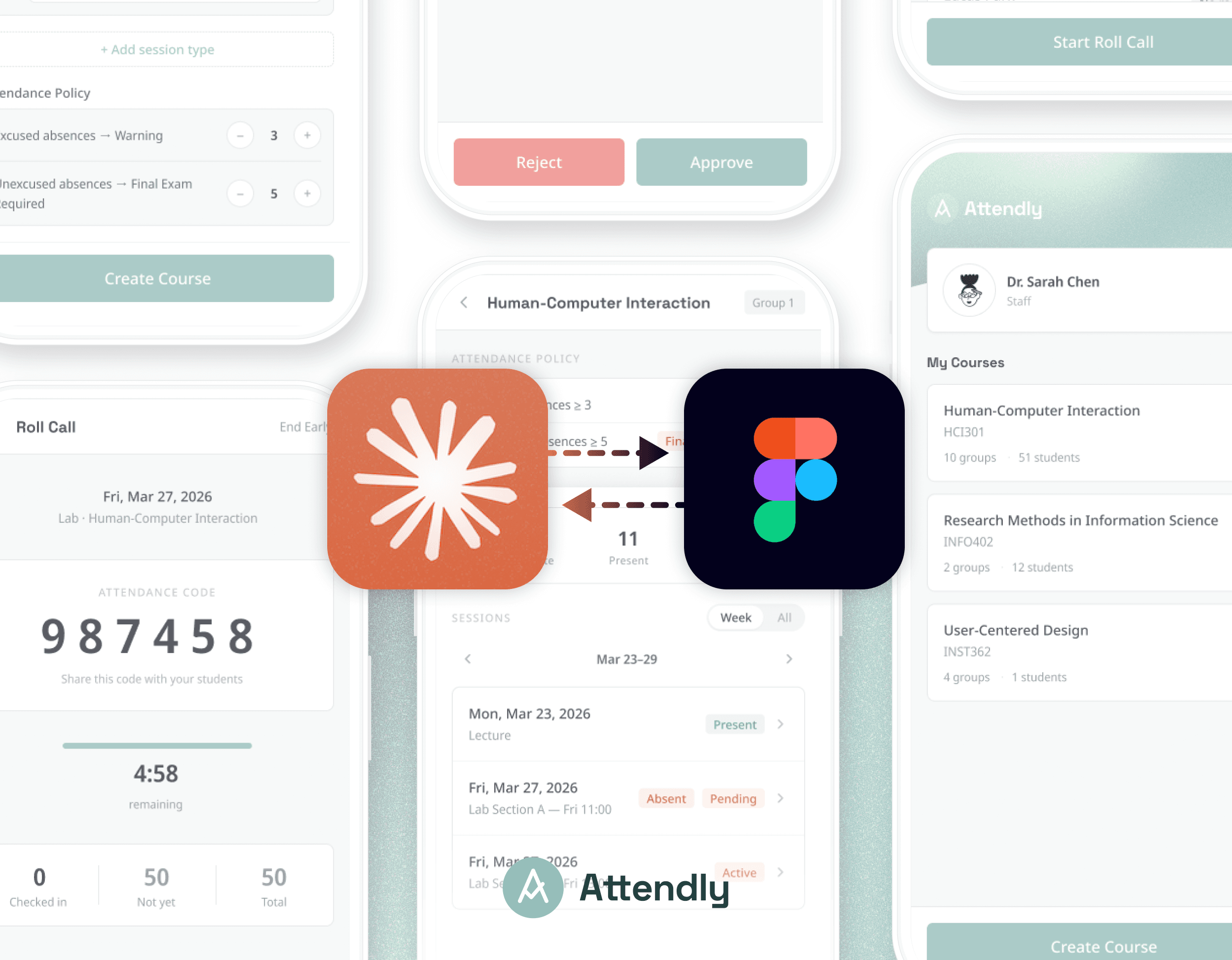
From Designer to Builder: Turning Ideas into Working Products with AI
From Designer to Builder: Turning Ideas into Working Products with AI
From Designer to Builder: Turning Ideas into Working Products with AI
Using Claude Code and Figma MCP to create a design ↔ code workflow, turning ideas into working products—demonstrated through Attendly.
Using Claude Code and Figma MCP to create a design ↔ code workflow, turning ideas into working products—demonstrated through Attendly.
Using Claude Code and Figma MCP to create a design ↔ code workflow, turning ideas into working products—demonstrated through Attendly.
Role
Role
Role
Product Designer· AI-assisted Builder(Solo)
Product Designer· AI-assisted Builder(Solo)
Product Designer· AI-assisted Builder(Solo)
Timeline
Timeline
Timeline
1 day sprint · Mar 25, 2026
1 day sprint · Mar 25, 2026
1 day sprint · Mar 25, 2026
Tools
Tools
Tools
Claude Code + Figma MCP · Cursor · GitHub · Zeabur
Claude Code + Figma MCP · Cursor · GitHub · Zeabur
Claude Code + Figma MCP · Cursor · GitHub · Zeabur
1. Project Context
1. Project Context
While working as a Teaching Assistant at the University of Maryland, I was responsible for managing attendance for 150+ students, handling absence requests via email, and keeping track of overall attendance status. In practice, these tasks were fragmented across multiple tools—ELMS (a course management system), Google Forms and spreadsheets, and email, requiring significant manual coordination and constant context switching.
While working as a Teaching Assistant at the University of Maryland, I was responsible for managing attendance for 150+ students, handling absence requests via email, and keeping track of overall attendance status. In practice, these tasks were fragmented across multiple tools—ELMS (a course management system), Google Forms and spreadsheets, and email, requiring significant manual coordination and constant context switching.
This problem had existed for a long time, but due to technical limitations, I had previously accepted these inefficiencies rather than turning the idea into a real product. After exploring Claude Code and Figma MCP, I saw an opportunity to move beyond static design concepts and directly build a working system.
This problem had existed for a long time, but due to technical limitations, I had previously accepted these inefficiencies rather than turning the idea into a real product. After exploring Claude Code and Figma MCP, I saw an opportunity to move beyond static design concepts and directly build a working system.
Starting from this familiar pain point, I set out to experiment with an AI-enabled workflow that bridges idea → prototype → product, and built Attendly, a system that integrates attendance tracking, absence requests, and policy-based decision-making into a single experience.
Starting from this familiar pain point, I set out to experiment with an AI-enabled workflow that bridges idea → prototype → product, and built Attendly, a system that integrates attendance tracking, absence requests, and policy-based decision-making into a single experience.
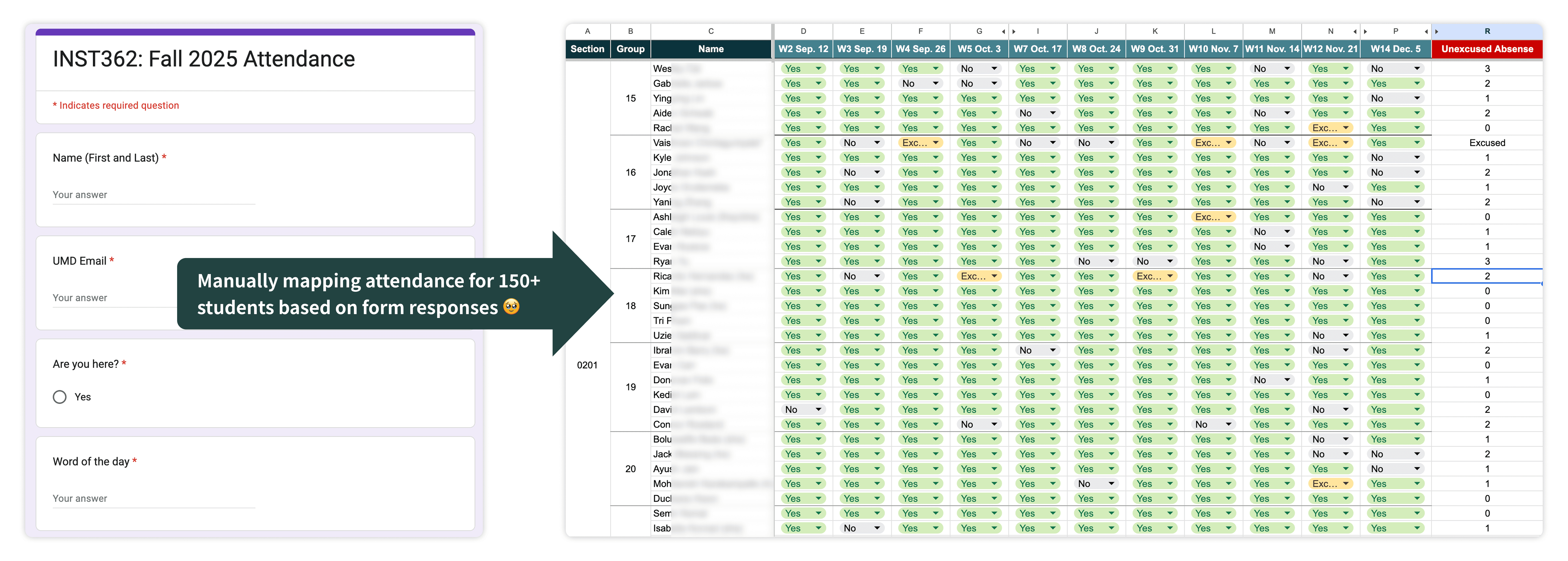
Attendance tracking requires manual consolidation across tools and mapping responses to individual students, making it difficult to view group-level attendance.
Attendance tracking requires manual consolidation across tools and mapping responses to individual students, making it difficult to view group-level attendance.
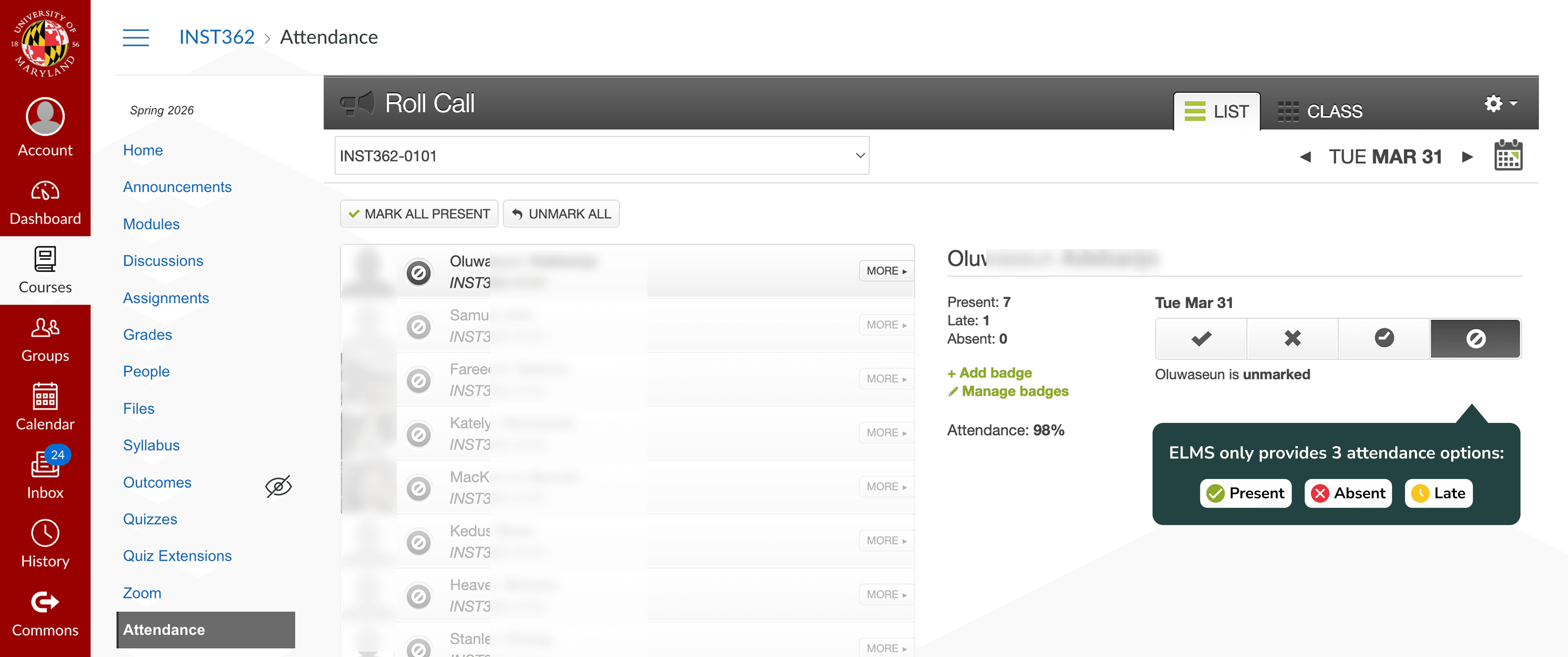
ELMS only supports basic attendance statuses (present, absent, late), with no support for excused absences or group-level tracking.
ELMS only supports basic attendance statuses (present, absent, late), with no support for excused absences or group-level tracking.
1. Project Context
While working as a Teaching Assistant at the University of Maryland, I was responsible for managing attendance for 150+ students, handling absence requests via email, and keeping track of overall attendance status. In practice, these tasks were fragmented across multiple tools—ELMS (a course management system), Google Forms and spreadsheets, and email, requiring significant manual coordination and constant context switching.
This problem had existed for a long time, but due to technical limitations, I had previously accepted these inefficiencies rather than turning the idea into a real product. After exploring Claude Code and Figma MCP, I saw an opportunity to move beyond static design concepts and directly build a working system.
Starting from this familiar pain point, I set out to experiment with an AI-enabled workflow that bridges idea → prototype → product, and built Attendly, a system that integrates attendance tracking, absence requests, and policy-based decision-making into a single experience.
Attendance tracking requires manual consolidation across tools and mapping responses to individual students, making it difficult to view group-level attendance.
ELMS only supports basic attendance statuses (present, absent, late), with no support for excused absences or group-level tracking.
How AI Changed My Design Workflow
How AI Changed My Design Workflow
How AI Changed My Design Workflow
01 From Design Handoff to Continuous Design–Development Sync
01 From Design Handoff to Continuous Design–Development Sync
01 From Design Handoff to Continuous Design–Development Sync
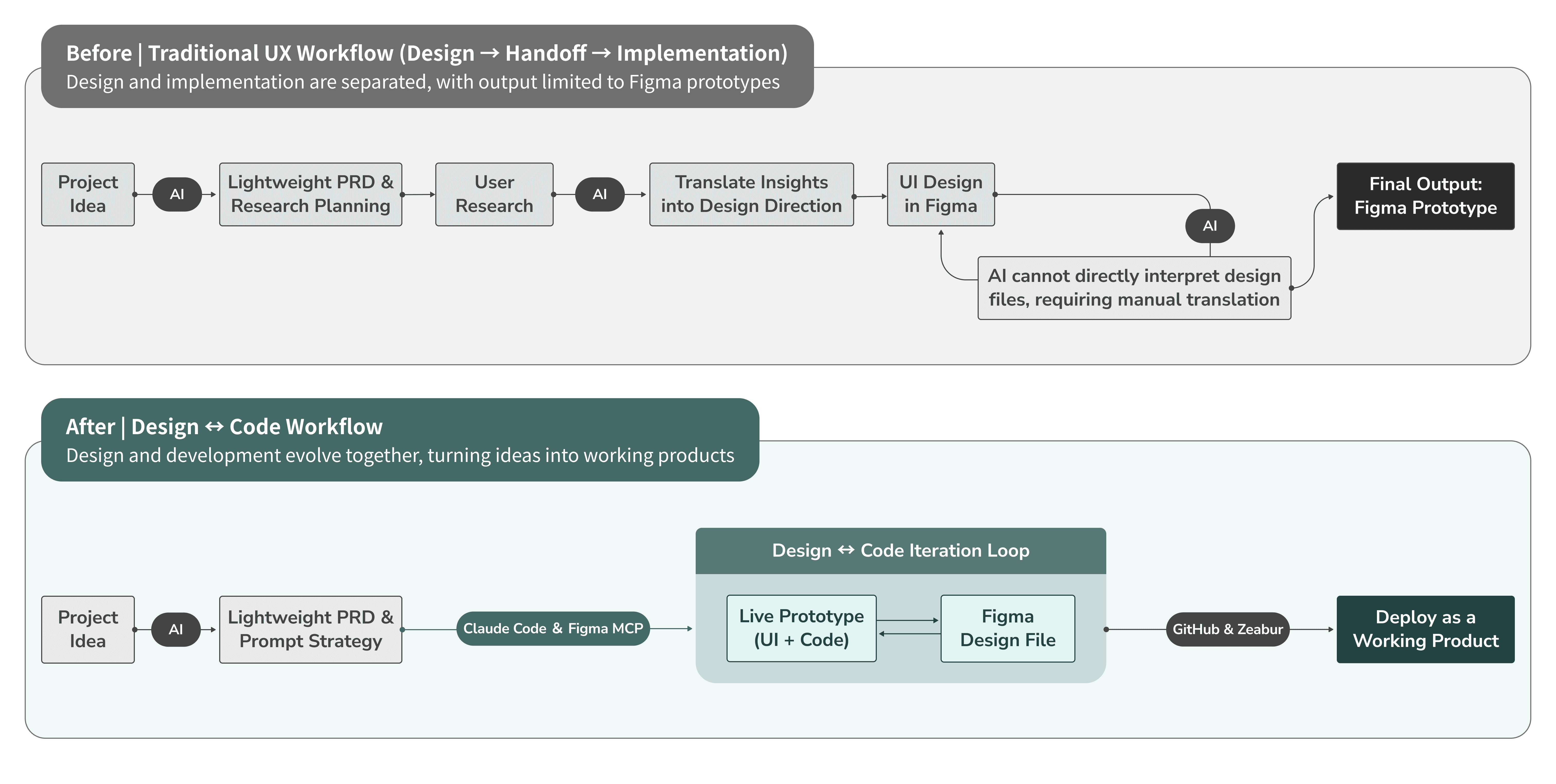
Previously, my design output stopped at Figma prototypes. Even when using ChatGPT, AI mainly supported ideation and discussion, it could not directly interpret or interact with design files. As a result, communication relied on screenshots and text descriptions, and the overall workflow remained linear and disconnected.
Previously, my design output stopped at Figma prototypes. Even when using ChatGPT, AI mainly supported ideation and discussion, it could not directly interpret or interact with design files. As a result, communication relied on screenshots and text descriptions, and the overall workflow remained linear and disconnected.
Previously, my design output stopped at Figma prototypes. Even when using ChatGPT, AI mainly supported ideation and discussion, it could not directly interpret or interact with design files. As a result, communication relied on screenshots and text descriptions, and the overall workflow remained linear and disconnected.
In this project, by using Claude Code with Figma MCP, my workflow shifted into a continuous loop between design and development. I can generate a working interface directly from an idea, refine it in Figma, and sync those changes back to the product in real time.
In this project, by using Claude Code with Figma MCP, my workflow shifted into a continuous loop between design and development. I can generate a working interface directly from an idea, refine it in Figma, and sync those changes back to the product in real time.
In this project, by using Claude Code with Figma MCP, my workflow shifted into a continuous loop between design and development. I can generate a working interface directly from an idea, refine it in Figma, and sync those changes back to the product in real time.
Design and implementation are no longer separated by handoff. Instead, they evolve together through ongoing iteration. This also changes the final output, from a static prototype to a deployable, working product.
Design and implementation are no longer separated by handoff. Instead, they evolve together through ongoing iteration. This also changes the final output, from a static prototype to a deployable, working product.
Design and implementation are no longer separated by handoff. Instead, they evolve together through ongoing iteration. This also changes the final output, from a static prototype to a deployable, working product.
02 Design ↔ Code Bidirectional Iteration Demo
02 Design ↔ Code Bidirectional Iteration Demo
02 Design ↔ Code Bidirectional Iteration Demo
The video below demonstrates a full cycle of the design ↔ code workflow. I first generate a UI in Claude Code, then use Figma MCP to import it into Figma with editable layers and structure. After making design adjustments, I send the updated design back to Claude Code to reflect those changes in the product.
The video below demonstrates a full cycle of the design ↔ code workflow. I first generate a UI in Claude Code, then use Figma MCP to import it into Figma with editable layers and structure. After making design adjustments, I send the updated design back to Claude Code to reflect those changes in the product.
The video below demonstrates a full cycle of the design ↔ code workflow. I first generate a UI in Claude Code, then use Figma MCP to import it into Figma with editable layers and structure. After making design adjustments, I send the updated design back to Claude Code to reflect those changes in the product.
This process removes the need for traditional handoff or translation. Instead, design and product stay continuously aligned through real-time iteration.
This process removes the need for traditional handoff or translation. Instead, design and product stay continuously aligned through real-time iteration.
This process removes the need for traditional handoff or translation. Instead, design and product stay continuously aligned through real-time iteration.
03 Rethinking the Designer’s Role in an AI-Accelerated Workflow
03 Rethinking the Designer’s Role in an AI-Accelerated Workflow
03 Rethinking the Designer’s Role in an AI-Accelerated Workflow
AI has made it significantly easier to build things, but it also amplifies existing problems. When generation becomes effortless, the question is no longer “Can we build it?” but rather “What are we building, how are we building it, and does it actually make sense?”
AI has made it significantly easier to build things, but it also amplifies existing problems. When generation becomes effortless, the question is no longer “Can we build it?” but rather “What are we building, how are we building it, and does it actually make sense?”
AI has made it significantly easier to build things, but it also amplifies existing problems. When generation becomes effortless, the question is no longer “Can we build it?” but rather “What are we building, how are we building it, and does it actually make sense?”
Through this process, I realized that the key is not the tool itself, but the decisions behind it, how problems are defined, how prompts are structured, and how design quality is evaluated. The following three points reflect the most important shifts I experienced in this workflow.
Through this process, I realized that the key is not the tool itself, but the decisions behind it, how problems are defined, how prompts are structured, and how design quality is evaluated. The following three points reflect the most important shifts I experienced in this workflow.
Through this process, I realized that the key is not the tool itself, but the decisions behind it, how problems are defined, how prompts are structured, and how design quality is evaluated. The following three points reflect the most important shifts I experienced in this workflow.
1
1
1
AI makes it easy to start, but it doesn’t define the problem
AI makes it easy to start, but it doesn’t define the problem
AI makes it easy to start, but it doesn’t define the problem
Challenge
Challenge
Challenge
With AI tools, it’s easy to jump straight into generating UI. Many people start building while figuring things out along the way, which often leads to unclear direction and misaligned outcomes. AI lowers the barrier to starting, but it doesn’t help define what should be built.
With AI tools, it’s easy to jump straight into generating UI. Many people start building while figuring things out along the way, which often leads to unclear direction and misaligned outcomes. AI lowers the barrier to starting, but it doesn’t help define what should be built.
With AI tools, it’s easy to jump straight into generating UI. Many people start building while figuring things out along the way, which often leads to unclear direction and misaligned outcomes. AI lowers the barrier to starting, but it doesn’t help define what should be built.
My approach
My approach
My approach
Before generating anything, I take time to clarify the problem. I write a lightweight PRD to define the purpose, target users, and constraints. This step hasn’t disappeared with AI, in fact, it has become more critical. If the direction is unclear, AI will only help you move faster in the wrong direction.
Before generating anything, I take time to clarify the problem. I write a lightweight PRD to define the purpose, target users, and constraints. This step hasn’t disappeared with AI, in fact, it has become more critical. If the direction is unclear, AI will only help you move faster in the wrong direction.
Before generating anything, I take time to clarify the problem. I write a lightweight PRD to define the purpose, target users, and constraints. This step hasn’t disappeared with AI, in fact, it has become more critical. If the direction is unclear, AI will only help you move faster in the wrong direction.
2
2
2
Prompts are the primary input, but rarely designed intentionally
Prompts are the primary input, but rarely designed intentionally
Prompts are the primary input, but rarely designed intentionally
Challenge
Challenge
Challenge
In AI-driven workflows, prompts are often the main (and sometimes only) input. However, they are frequently vague or one-off. Saying “build an attendance management system” versus specifying requirements, constraints, and flows leads to drastically different results, and significantly affects how easy it is to iterate afterward.
In AI-driven workflows, prompts are often the main (and sometimes only) input. However, they are frequently vague or one-off. Saying “build an attendance management system” versus specifying requirements, constraints, and flows leads to drastically different results, and significantly affects how easy it is to iterate afterward.
In AI-driven workflows, prompts are often the main (and sometimes only) input. However, they are frequently vague or one-off. Saying “build an attendance management system” versus specifying requirements, constraints, and flows leads to drastically different results, and significantly affects how easy it is to iterate afterward.
My approach
My approach
My approach
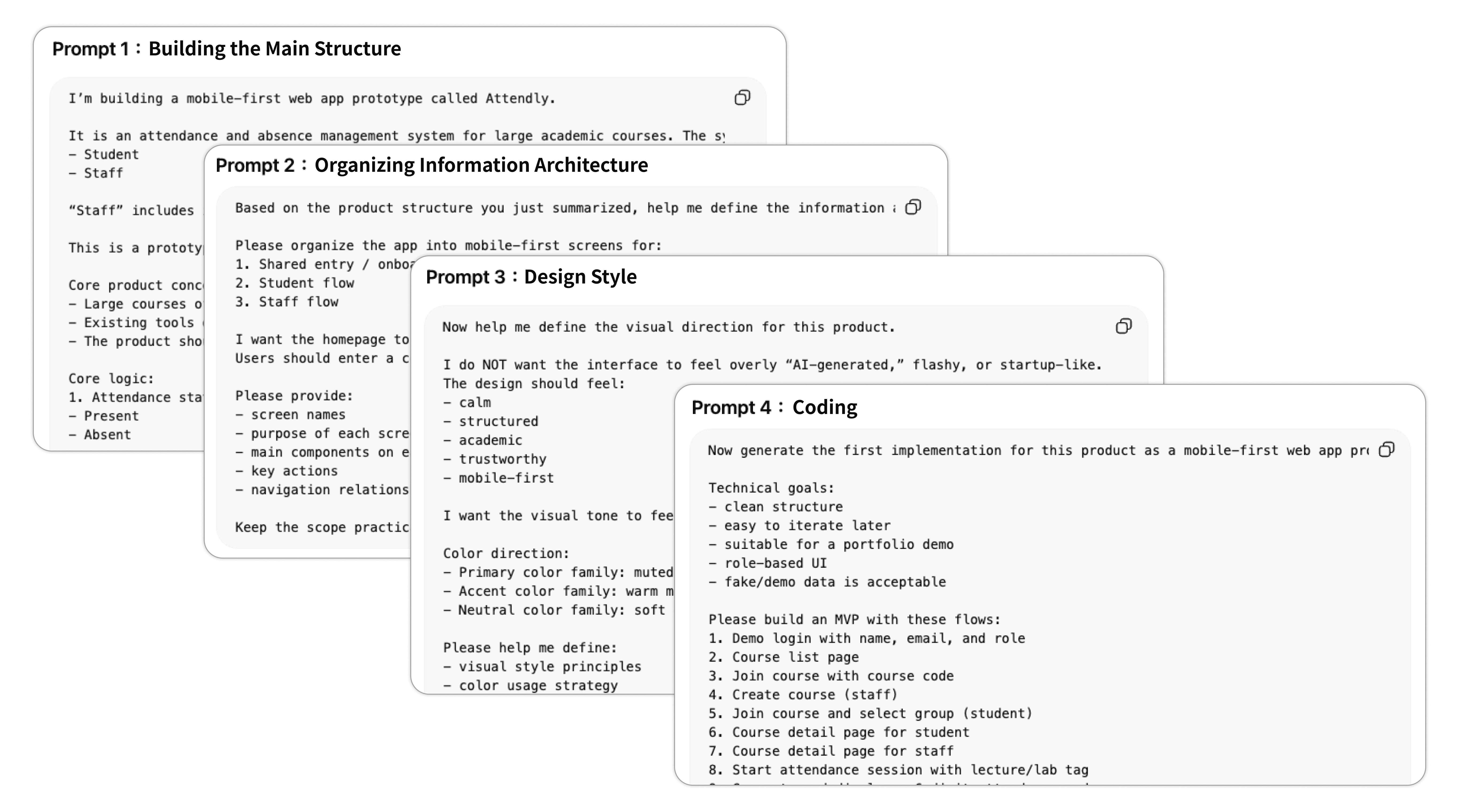
I treat prompts as part of the design process. Especially when working in areas outside my expertise, such as coding with Claude Code, I first use ChatGPT or other text-based AI to structure the requirements and refine the prompt strategy. In this project, I broke prompts into stages, starting with generating user flows to align on direction before moving on to UI. This made the process more controlled and predictable.
I treat prompts as part of the design process. Especially when working in areas outside my expertise, such as coding with Claude Code, I first use ChatGPT or other text-based AI to structure the requirements and refine the prompt strategy. In this project, I broke prompts into stages, starting with generating user flows to align on direction before moving on to UI. This made the process more controlled and predictable.
I treat prompts as part of the design process. Especially when working in areas outside my expertise, such as coding with Claude Code, I first use ChatGPT or other text-based AI to structure the requirements and refine the prompt strategy. In this project, I broke prompts into stages, starting with generating user flows to align on direction before moving on to UI. This made the process more controlled and predictable.
3
3
3
AI can generate interfaces, but not judge design quality
AI can generate interfaces, but not judge design quality
AI can generate interfaces, but not judge design quality
Challenge
Challenge
Challenge
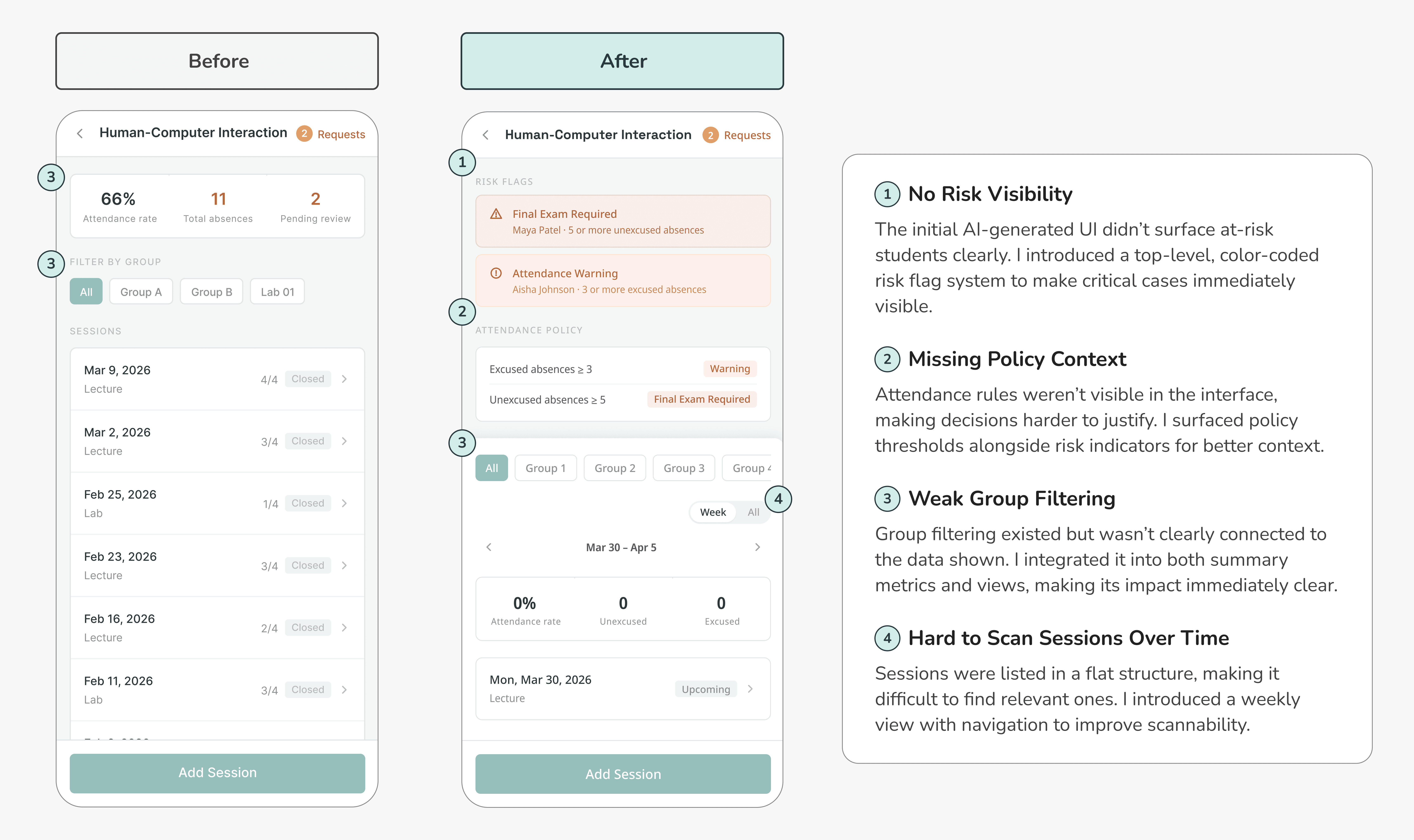
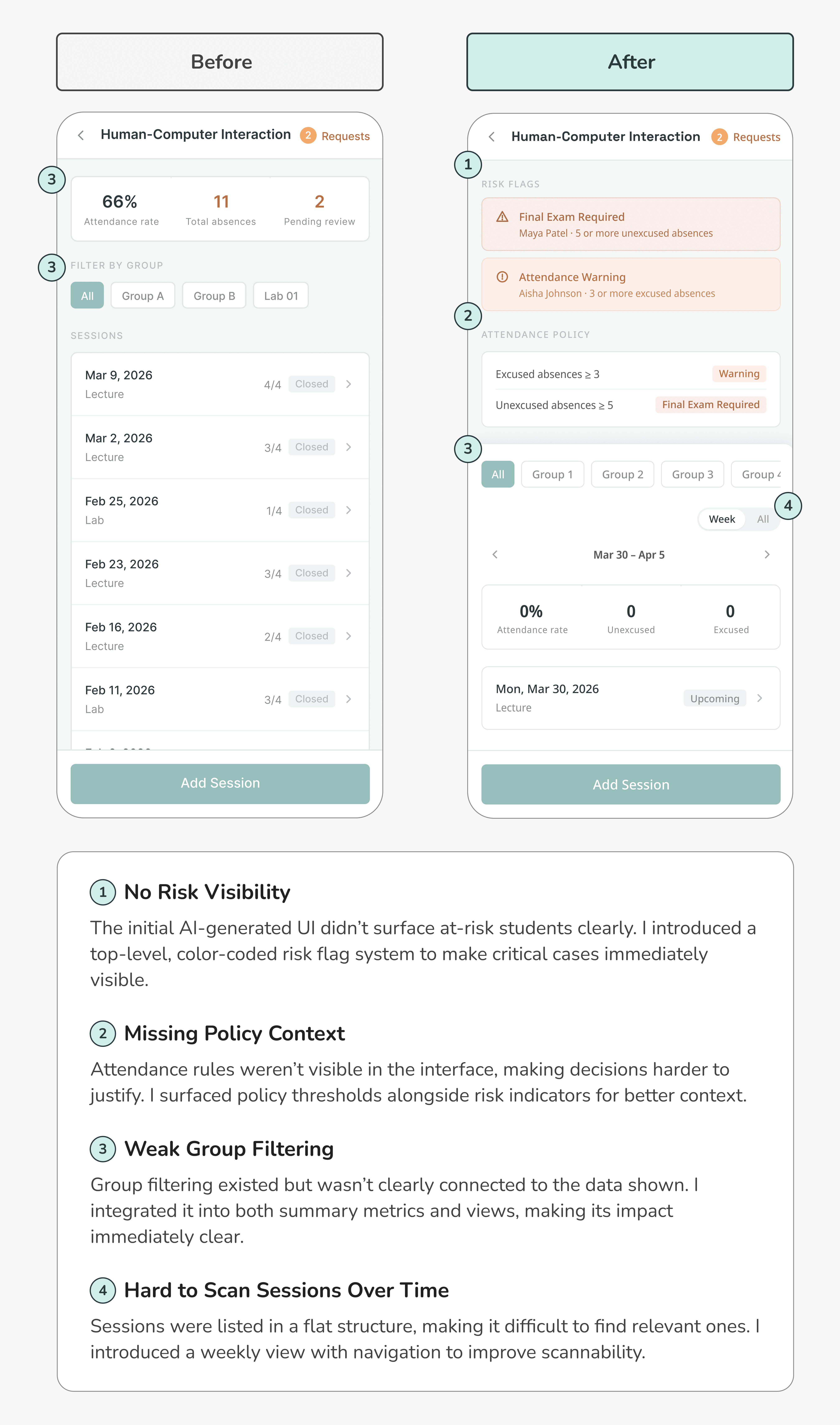
AI can quickly produce interfaces that look complete, but that doesn’t mean they are well-designed. For non-designers, these outputs may seem sufficient, but they often lack clarity in structure, flow, and alignment with user mental models.
AI can quickly produce interfaces that look complete, but that doesn’t mean they are well-designed. For non-designers, these outputs may seem sufficient, but they often lack clarity in structure, flow, and alignment with user mental models.
AI can quickly produce interfaces that look complete, but that doesn’t mean they are well-designed. For non-designers, these outputs may seem sufficient, but they often lack clarity in structure, flow, and alignment with user mental models.
My approach
My approach
My approach
At this stage, my role is to evaluate and refine. I rely on my background in UX, information architecture, user mental models, and visual design to identify what needs improvement. AI-generated output becomes a starting point, something to iterate on, rather than a final solution.
At this stage, my role is to evaluate and refine. I rely on my background in UX, information architecture, user mental models, and visual design to identify what needs improvement. AI-generated output becomes a starting point, something to iterate on, rather than a final solution.
At this stage, my role is to evaluate and refine. I rely on my background in UX, information architecture, user mental models, and visual design to identify what needs improvement. AI-generated output becomes a starting point, something to iterate on, rather than a final solution.
3. Project Details
3. Project Details
01 Product Overview
01 Product Overview
Attendly is an attendance management system that integrates tracking, absence requests, and course policies into a single interface.
Attendly is an attendance management system that integrates tracking, absence requests, and course policies into a single interface.
It enables instructors and TAs to manage workflows that were previously scattered across multiple tools.
It enables instructors and TAs to manage workflows that were previously scattered across multiple tools.
The system supports real-time attendance tracking, absence requests and approvals, and automatically flags at-risk students based on course-specific policies, helping staff quickly understand class status and make informed decisions.
The system supports real-time attendance tracking, absence requests and approvals, and automatically flags at-risk students based on course-specific policies, helping staff quickly understand class status and make informed decisions.
02 Target Users
02 Target Users
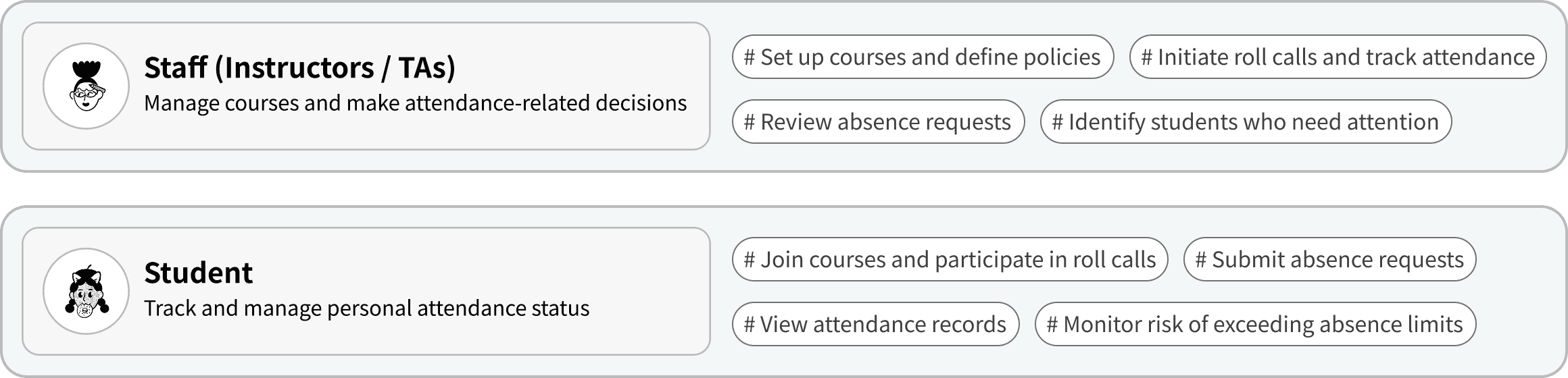
Attendly serves two primary user groups: Staff (Instructors / TAs) and Students, each with distinct responsibilities and interaction patterns within the course.
Attendly serves two primary user groups: Staff (Instructors / TAs) and Students, each with distinct responsibilities and interaction patterns within the course.
03 Core Flows & Dual-Role Experience
03 Core Flows & Dual-Role Experience
Attendly is structured around three key phases: course setup, ongoing interactions, and attendance monitoring, while supporting both staff and student workflows.
Attendly is structured around three key phases: course setup, ongoing interactions, and attendance monitoring, while supporting both staff and student workflows.
The diagram below provides an overview of the system’s structure and flow.
The diagram below provides an overview of the system’s structure and flow.
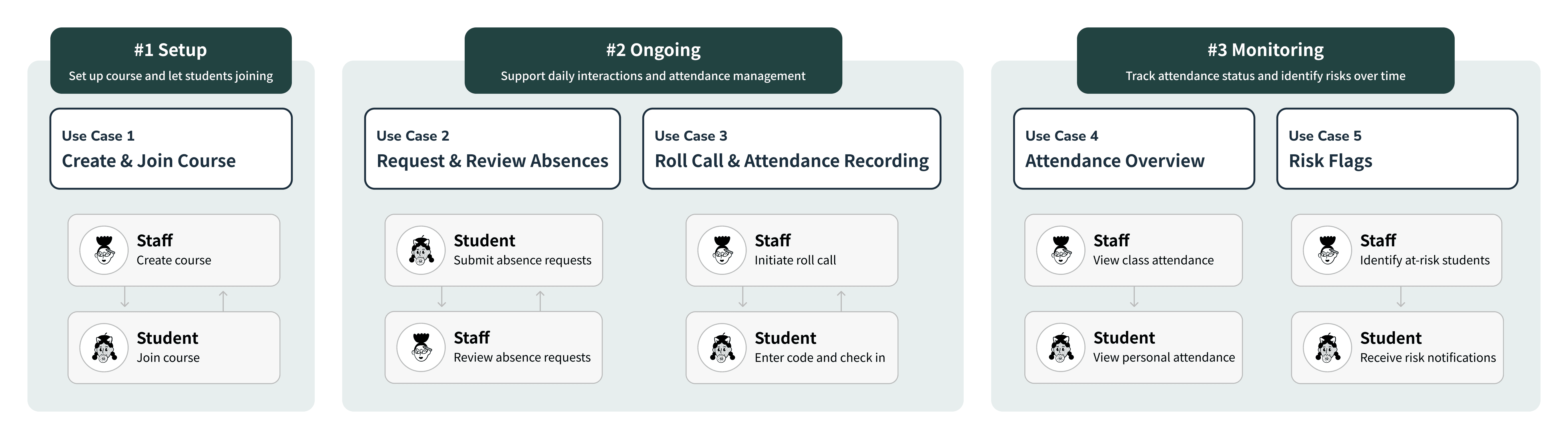
Based on this framework, the following sections demonstrate key use cases, showing how Attendly supports both roles across different stages of interaction and decision-making.
Based on this framework, the following sections demonstrate key use cases, showing how Attendly supports both roles across different stages of interaction and decision-making.
#1 Setup
#1 Setup
Use Case 1
Use Case 1
Create & Join Course
Create & Join Course
Staff (Instructors / TAs) create a course and generate a course code. Students join the course and their assigned group by entering the code.
Staff (Instructors / TAs) create a course and generate a course code. Students join the course and their assigned group by entering the code.
Staff
Staff
Student
Student
Student
Student
Staff
Staff
#2 Ongoing
#2 Ongoing
Use Case 2
Use Case 2
Request & Review Absences
Request & Review Absences
Students can submit absence requests for past or upcoming sessions, including a reason. Staff review requests in one place and determine whether they qualify as excused absences.
Students can submit absence requests for past or upcoming sessions, including a reason. Staff review requests in one place and determine whether they qualify as excused absences.
#2 Ongoing
#2 Ongoing
Use Case 3
Use Case 3
Roll Call & Attendance Recording
Roll Call & Attendance Recording
Staff initiate roll call during class, generating a time-limited code. Students enter the code to check in, and attendance records update in real time.
Staff initiate roll call during class, generating a time-limited code. Students enter the code to check in, and attendance records update in real time.
Staff
Staff
Student
Student
Staff
Staff
Student
Student
#3 Monitoring
#3 Monitoring
Use Case 4
Use Case 4
Attendance Overview
Attendance Overview
Staff can view attendance from multiple perspectives (All students / By group, Week / All sessions). Students can track their own attendance rate and absence history at any time.
Staff can view attendance from multiple perspectives (All students / By group, Week / All sessions). Students can track their own attendance rate and absence history at any time.
#3 Monitoring
#3 Monitoring
Use Case 5
Use Case 5
Risk Flags
Risk Flags
Based on course-specific attendance policies, the system automatically flags students who exceed absence thresholds. Visual indicators help staff and students identify risks early and take action.
Based on course-specific attendance policies, the system automatically flags students who exceed absence thresholds. Visual indicators help staff and students identify risks early and take action.
Staff
Staff
Student
Student
3. Project Details
01 Product Overview
Attendly is an attendance management system that integrates tracking, absence requests, and course policies into a single interface.
It enables instructors and TAs to manage workflows that were previously scattered across multiple tools.
The system supports real-time attendance tracking, absence requests and approvals, and automatically flags at-risk students based on course-specific policies, helping staff quickly understand class status and make informed decisions.
02 Target Users
Attendly serves two primary user groups: Staff (Instructors / TAs) and Students, each with distinct responsibilities and interaction patterns within the course.
03 Core Flows & Dual-Role Experience
Attendly is structured around three key phases: course setup, ongoing interactions, and attendance monitoring, while supporting both staff and student workflows.
The diagram below provides an overview of the system’s structure and flow.
Based on this framework, the following sections demonstrate key use cases, showing how Attendly supports both roles across different stages of interaction and decision-making.
#1 Setup
Use Case 1
Create & Join Course
Staff (Instructors / TAs) create a course and generate a course code. Students join the course and their assigned group by entering the code.
Staff
Student
Student
Staff
#2 Ongoing
Use Case 2
Request & Review Absences
Students can submit absence requests for past or upcoming sessions, including a reason. Staff review requests in one place and determine whether they qualify as excused absences.
#2 Ongoing
Use Case 3
Roll Call & Attendance Recording
Staff initiate roll call during class, generating a time-limited code. Students enter the code to check in, and attendance records update in real time.
Staff
Student
Staff
Student
#3 Monitoring
Use Case 4
Attendance Overview
Staff can view attendance from multiple perspectives (All students / By group, Week / All sessions). Students can track their own attendance rate and absence history at any time.
#3 Monitoring
Use Case 5
Risk Flags
Based on course-specific attendance policies, the system automatically flags students who exceed absence thresholds. Visual indicators help staff and students identify risks early and take action.
Staff
Student
4. Reflection & Learning
4. Reflection & Learning
4. Reflection & Learning
1
1
1
Stay open, but not tool-driven
Stay open, but not tool-driven
Stay open, but not tool-driven
As more AI tools emerged, I initially felt resistant and even worried about being replaced. However, through this project, I realized that the goal isn’t to embrace or reject AI, but to understand how and when to use it.
As more AI tools emerged, I initially felt resistant and even worried about being replaced. However, through this project, I realized that the goal isn’t to embrace or reject AI, but to understand how and when to use it.
As more AI tools emerged, I initially felt resistant and even worried about being replaced. However, through this project, I realized that the goal isn’t to embrace or reject AI, but to understand how and when to use it.
What matters to me is not whether I use AI, but why. I tend to use it when there is a clear problem or goal, rather than using it for the sake of experimentation. This keeps the process intentional, instead of just producing something that looks impressive.
What matters to me is not whether I use AI, but why. I tend to use it when there is a clear problem or goal, rather than using it for the sake of experimentation. This keeps the process intentional, instead of just producing something that looks impressive.
What matters to me is not whether I use AI, but why. I tend to use it when there is a clear problem or goal, rather than using it for the sake of experimentation. This keeps the process intentional, instead of just producing something that looks impressive.
2
2
2
My value as a designer lies in judgment, not output
My value as a designer lies in judgment, not output
My value as a designer lies in judgment, not output
This experience made it clear that while AI can accelerate output, it cannot determine what makes a design good. Many generated interfaces may look “usable,” but still lack clarity in structure, flow, or alignment with user mental models.
This experience made it clear that while AI can accelerate output, it cannot determine what makes a design good. Many generated interfaces may look “usable,” but still lack clarity in structure, flow, or alignment with user mental models.
This experience made it clear that while AI can accelerate output, it cannot determine what makes a design good. Many generated interfaces may look “usable,” but still lack clarity in structure, flow, or alignment with user mental models.
My role in this process was to evaluate and refine, drawing on my experience in UX, information architecture, and interaction design to identify what needs improvement. It reinforced my belief that a designer’s value is not just in making things, but in deciding what is right.
My role in this process was to evaluate and refine, drawing on my experience in UX, information architecture, and interaction design to identify what needs improvement. It reinforced my belief that a designer’s value is not just in making things, but in deciding what is right.
My role in this process was to evaluate and refine, drawing on my experience in UX, information architecture, and interaction design to identify what needs improvement. It reinforced my belief that a designer’s value is not just in making things, but in deciding what is right.
3
3
3
Curiosity and problem awareness still come first
Curiosity and problem awareness still come first
Curiosity and problem awareness still come first
This project didn’t start from a new technology, but from a problem I had experienced over time. It reminded me that strong products don’t come from complex tools, but from a clear understanding of user needs and pain points.
This project didn’t start from a new technology, but from a problem I had experienced over time. It reminded me that strong products don’t come from complex tools, but from a clear understanding of user needs and pain points.
This project didn’t start from a new technology, but from a problem I had experienced over time. It reminded me that strong products don’t come from complex tools, but from a clear understanding of user needs and pain points.
I found that I’m most motivated when working on real problems, using building as a way to explore and validate ideas, rather than creating something for its own sake. This mindset also helps me approach new tools and technologies with clearer direction and purpose.
I found that I’m most motivated when working on real problems, using building as a way to explore and validate ideas, rather than creating something for its own sake. This mindset also helps me approach new tools and technologies with clearer direction and purpose.
I found that I’m most motivated when working on real problems, using building as a way to explore and validate ideas, rather than creating something for its own sake. This mindset also helps me approach new tools and technologies with clearer direction and purpose.
Other Works

Other Works
Other Works
Other Works